JavaScript — 0 dan Expertgacha (O'zbek tilida)
📚 README · ← 3-qism — Brauzer (DOM) · Keyingi: 5-qism (1-bo'lim) — Chuqur JS →
4-QISM: ASINXRON JS JS qanday "kutadi", server bilan qanday gaplashadi. Bu — eng muhim va eng ko'p chalkashtiradigan qism. Har bir moduldan keyin 20 ta masala (yechimi bilan).
1-3 qismda JS darhol ishlaydigan kod yozdik. Lekin real hayotda biz kutishimiz kerak: serverdan javob, fayl yuklanishi, taymer. Bu — asinxron dunyosi.
🔑 Avval: JS bitta yo'lakli (single-threaded)
JS bir vaqtning o'zida faqat bitta ishni bajaradi. U "bitta oshpaz" kabi — bir vaqtda bir taom tayyorlaydi.
Muammo: agar serverdan ma'lumot so'rasak va u 3 soniya kutsa, JS shu 3 soniya butun sahifani muzlatib turishi kerakmi? Yo'q! Foydalanuvchi tugma bosa olmaydi, hech narsa ishlamaydi — bu dahshat.
Yechim: JS uzoq vaqt talab qiladigan ishni (taymer, server so'rovi) fonga beradi va keyingi koddan davom etadi. Ish tugagach, natijani qayta oladi. Mana shu — asinxronlik.
13-MODUL: Callbacks va Event Loop
setTimeout — kechiktirish
Eng oddiy asinxron misol — biror amalni keyinroq bajarish:
console.log("Boshlandi");

setTimeout(() => {
  console.log("2 soniyadan keyin");
}, 2000); // 2000 ms = 2 soniya

console.log("Tugadi");

// Natija:
// Boshlandi
// Tugadi          <- bu DARHOL chiqadi (kutmaydi!)
// 2 soniyadan keyin <- 2 soniyadan so'ng
Why diqqat:
setTimeoutJS'ni to'xtatib qo'ymaydi. U "2 soniyadan keyin shu funksiyani ishga tushir" deb fonga beradi va keyingi qatorga o'tadi. Shuning uchun "Tugadi" "2 soniyadan keyin"dan oldin chiqadi.
setInterval — takroriy bajarish
let son = 0;
const id = setInterval(() => {
  son++;
  console.log(son);
  if (son === 5) clearInterval(id); // 5 da to'xtatamiz
}, 1000); // har 1 soniyada
clearInterval(id) / clearTimeout(id) — taymerni to'xtatadi. Shuning uchun taymerning idsini saqlab qol.
Callback nima?
Callback — boshqa funksiyaga argument sifatida uzatilgan funksiya. "Ish tugagach, mana buni chaqir" degani. setTimeoutning birinchi argumenti — callback.
function salomBer(ism, callback) {
  console.log(`Salom, ${ism}`);
  callback(); // ish tugagach chaqiramiz
}

salomBer("Oqil", () => {
  console.log("Callback ishladi");
});
5-modulda "higher-order function" ko'rgan eding — callback aynan shu. JS'da funksiya — qiymat, shuning uchun uni uzatish mumkin.
Error-first callback (Node.js patterni)
Eski JS/Node kodida xato birinchi argument sifatida uzatiladi:
function malumotOl(callback) {
  setTimeout(() => {
    const xato = null;
    const data = { ism: "Oqil" };
    callback(xato, data); // (xato, natija)
  }, 1000);
}

malumotOl((err, data) => {
  if (err) {
    console.log("Xato:", err);
    return;
  }
  console.log("Natija:", data);
});
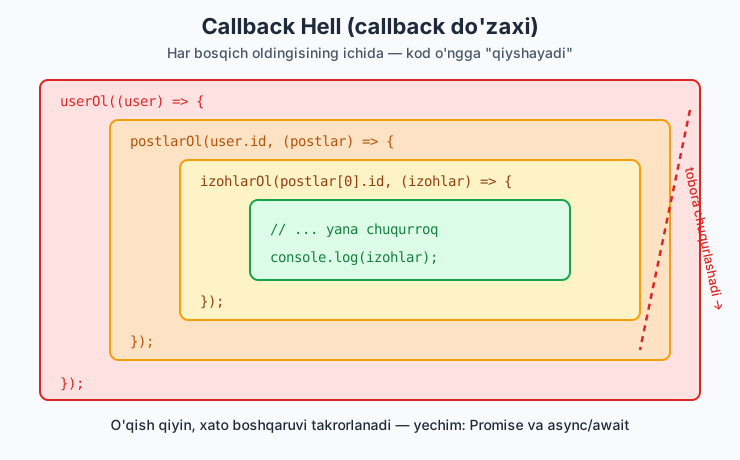
⚠️ Callback Hell (callback do'zaxi)
Ketma-ket asinxron amallar kerak bo'lsa, callbacklar ichma-ich joylashib ketadi — o'qib bo'lmaydigan "piramida":
malumotOl((err, user) => {
  postlarOl(user.id, (err, postlar) => {
    izohlarOl(postlar[0].id, (err, izohlar) => {
      // ... yana chuqurroq
      console.log(izohlar);
    });
  });
});
Why muammo: Bu kod o'ngga "qiyshayib" ketadi, xatolarni boshqarish takrorlanadi, o'qish qiyin. Aynan shu muammoni hal qilish uchun Promises (14-modul) va async/await (15-modul) yaratilgan. Callbacklarni tushunish kerak, lekin yangi kodda Promise ishlat.
🧠 Event Loop — JS qanday "kutadi"
Bu — JS'ning eng muhim va eng chalkash tushunchasi. Diqqat bilan o'qi.
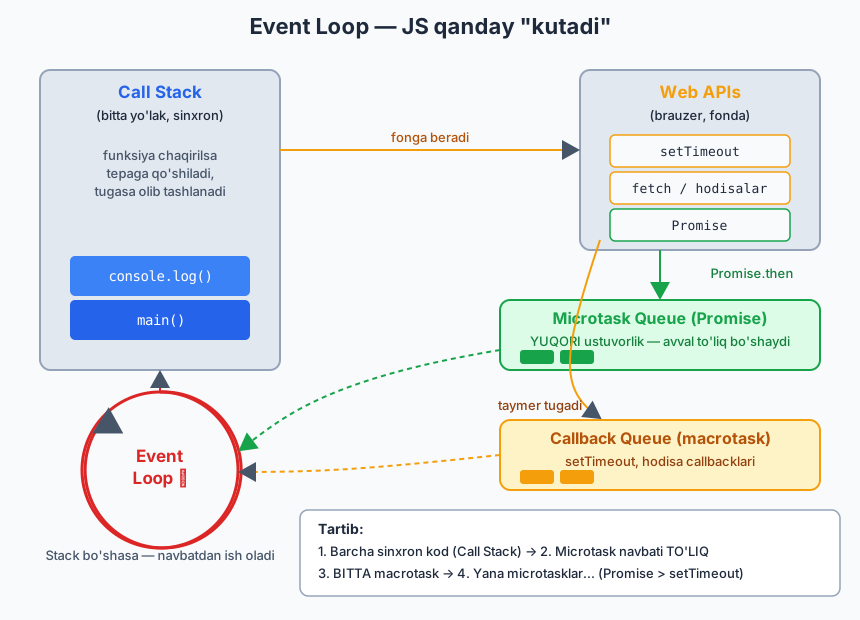
JS quyidagi qismlardan iborat:
1. Call Stack — joriy bajarilayotgan kod (sinxron). Bitta yo'lak.
2. Web APIs — brauzer beradigan "fon ishchilar": setTimeout, fetch, hodisalar. Ular alohida ishlaydi.
3. Callback Queue (macrotask) — setTimeout, hodisa callbacklari navbati.
4. Microtask Queue — Promise callbacklari navbati (yuqori ustuvorlikka ega).
5. Event Loop — "nazoratchi": Call Stack bo'shasa, navbatdan ish oladi.
Qoidalar:
- Avval barcha sinxron kod ishlaydi (Call Stack).
- Stack bo'shagach, Event Loop avval Microtask navbatini to'liq bo'shatadi (Promiselar).
- Keyin bitta Macrotask (setTimeout) oladi.
- Yana microtasklarni bo'shatadi, va hokazo.
Klassik misol (intervyularda ko'p so'raladi):
console.log("1");

setTimeout(() => console.log("2"), 0); // macrotask

Promise.resolve().then(() => console.log("3")); // microtask

console.log("4");

// Natija: 1, 4, 3, 2
Nima uchun shunday:
1) "1" — sinxron, darhol
2) setTimeout -> Web API ga ketadi, callback navbatga qo'yiladi (macrotask)
3) Promise.then -> microtask navbatga
4) "4" — sinxron, darhol
--- sinxron kod tugadi, Call Stack bo'sh ---
5) Microtask navbati: "3" chiqadi (Promise macrotask'dan ustun!)
6) Macrotask navbati: "2" chiqadi
Why bu muhim: Bu tushuncha "nega Promise setTimeout'dan oldin ishladi?" degan savolga javob beradi. Microtask (Promise) doim macrotask (
setTimeout)'dan oldin bajariladi.setTimeout(fn, 0)ham "darhol" emas — sinxron kod va microtasklardan keyin ishlaydi.
Klassik tuzoq: var sikl ichida (let bilan tuzatish)
// ❌ var bilan — hammasi 3 chiqaradi:
for (var i = 0; i < 3; i++) {
  setTimeout(() => console.log(i), 100); // 3, 3, 3
}

// ✅ let bilan — to'g'ri:
for (let i = 0; i < 3; i++) {
  setTimeout(() => console.log(i), 100); // 0, 1, 2
}
Why:
varbutun siklda bittaini ishlatadi. Taymer ishlaganda sikl allaqachon tugagan (i=3).letesa har takrorda yangiiyaratadi. Bu —varni ishlatmaslikning yana bir sababi (1-modulda aytilgandek).
📝 13-modul masalalari (20 ta)
setTimeoutbilan 2 soniyadan keyin "Salom" chiqaring.- "Boshlandi",
setTimeout("o'rtada", 0), "Tugadi" — qaysi tartibda chiqadi? console.log("1"),setTimeout(..."2"..., 1000),console.log("3")tartibini bashorat qiling.setIntervalbilan har soniyada son chiqaring.clearIntervalbilan 5 ta sanagandan keyin to'xtating.setTimeoutni ishga tushirib, darholclearTimeoutbilan bekor qiling.salomBer(ism, callback)funksiyasi yozing — salom aytib, callbackni chaqirsin.[1,2,3]har elementi uchun callback chaqiruvchiharBiri(arr, cb)yozing.- Ketma-ket 3 ta
setTimeout(callback ichida callback) yozing. - Funksiya ishini tugatib, callbackni chaqirsin (natijani uzatib).
- Event loop:
1,setTimeout 2,Promise.then 3,4— tartibni yozing. - Uchta
setTimeout(300ms, 100ms, 200ms) — qaysi tartibda chiqadi? setTimeoutzanjiri bilan 1 dan 3 gacha har soniyada sanang.- Soxta fetch:
setTimeoutichida{ism:"Oqil"}ni callbackka uzating. - Error-first callback:
cb(err, data)patternini ishlatib, xato holatini boshqaring. - Sinxron va asinxron kod farqini bitta misolda ko'rsating.
varbilan sikl ichidasetTimeoutmuammosini ko'rsating, keyinletbilan tuzating.queueMicrotaskbilan microtask qo'shing vasetTimeoutdan oldin chiqishini ko'ring.- Callback hell: 3 darajali ichma-ich callback yozing (user → postlar → izohlar).
- Murakkab: 18-masaladagi callback hell'ni yozib, har bosqichni izohlang. (Keyingi modulda buni Promise bilan tozalaymiz.)
► Yechimlar
// 1
setTimeout(() => console.log("Salom"), 2000);

// 2 -> Boshlandi, Tugadi, o'rtada
console.log("Boshlandi");
setTimeout(() => console.log("o'rtada"), 0);
console.log("Tugadi");

// 3 -> 1, 3, 2
console.log("1");
setTimeout(() => console.log("2"), 1000);
console.log("3");

// 4
let s4 = 0;
const id4 = setInterval(() => console.log(++s4), 1000);
// (to'xtatish uchun: clearInterval(id4))

// 5
let s5 = 0;
const id5 = setInterval(() => {
  console.log(++s5);
  if (s5 === 5) clearInterval(id5);
}, 1000);

// 6
const t6 = setTimeout(() => console.log("ishlamaydi"), 1000);
clearTimeout(t6); // bekor qilindi

// 7
function salomBer(ism, callback) {
  console.log(`Salom, ${ism}`);
  callback();
}
salomBer("Oqil", () => console.log("tugadi"));

// 8
function harBiri(arr, cb) {
  for (const el of arr) cb(el);
}
harBiri([1, 2, 3], n => console.log(n * 10));

// 9
setTimeout(() => {
  console.log("1");
  setTimeout(() => {
    console.log("2");
    setTimeout(() => console.log("3"), 500);
  }, 500);
}, 500);

// 10
function ishBajar(callback) {
  const natija = 2 + 2;
  callback(natija);
}
ishBajar(r => console.log("Natija:", r)); // 4

// 11 -> 1, 4, 3, 2
console.log("1");
setTimeout(() => console.log("2"), 0);
Promise.resolve().then(() => console.log("3"));
console.log("4");

// 12 -> 100, 200, 300 (vaqt bo'yicha, kod tartibida emas)
setTimeout(() => console.log("300"), 300);
setTimeout(() => console.log("100"), 100);
setTimeout(() => console.log("200"), 200);

// 13
function sana(n) {
  if (n > 3) return;
  setTimeout(() => {
    console.log(n);
    sana(n + 1);
  }, 1000);
}
sana(1);

// 14
function soxtaFetch(callback) {
  setTimeout(() => callback({ ism: "Oqil" }), 1000);
}
soxtaFetch(data => console.log(data));

// 15
function malumotOl(cb) {
  setTimeout(() => {
    const xato = null; // xato bo'lsa: "Server xatosi"
    cb(xato, { ism: "Oqil" });
  }, 1000);
}
malumotOl((err, data) => {
  if (err) return console.log("Xato:", err);
  console.log("Data:", data);
});

// 16
console.log("Sinxron 1");
setTimeout(() => console.log("Asinxron"), 0);
console.log("Sinxron 2");
// Sinxron 1, Sinxron 2, Asinxron

// 17
for (var i = 0; i < 3; i++) setTimeout(() => console.log("var:", i), 10); // 3,3,3
for (let j = 0; j < 3; j++) setTimeout(() => console.log("let:", j), 10); // 0,1,2

// 18 -> microtask setTimeout'dan oldin
setTimeout(() => console.log("macrotask"), 0);
queueMicrotask(() => console.log("microtask"));
// microtask, macrotask

// 19 & 20 — callback hell
function userOl(cb) { setTimeout(() => cb({ id: 1 }), 500); }
function postlarOl(userId, cb) { setTimeout(() => cb([{ id: 10 }]), 500); }
function izohlarOl(postId, cb) { setTimeout(() => cb(["Zo'r!"]), 500); }

userOl((user) => {
  postlarOl(user.id, (postlar) => {
    izohlarOl(postlar[0].id, (izohlar) => {
      console.log(izohlar); // ["Zo'r!"]
      // Diqqat: kod o'ngga qiyshayib ketdi -> callback hell
    });
  });
});
14-MODUL: Promises
Promise nima?
Promise ("va'da") — kelajakda tugaydigan amal natijasini ifodalovchi obyekt. "Hozir natija yo'q, lekin keyinroq beraman (yoki xato chiqaraman)" degan va'da.
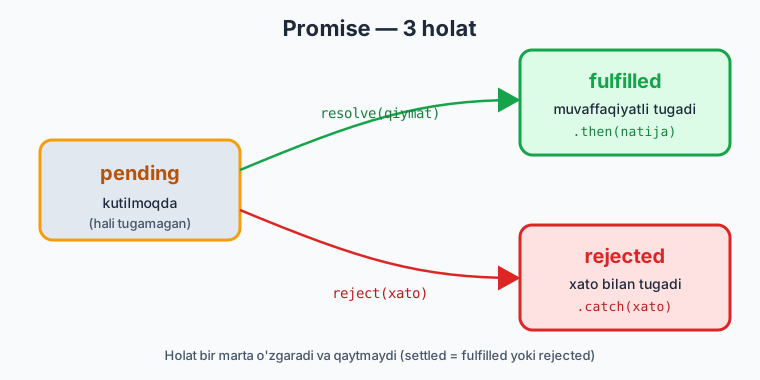
Promise 3 holatda bo'ladi:
- pending — kutilmoqda (hali tugamagan)
- fulfilled — muvaffaqiyatli tugadi (resolve chaqirildi)
- rejected — xato bilan tugadi (reject chaqirildi)
Promise yaratish
const vada = new Promise((resolve, reject) => {
  // asinxron ish...
  const muvaffaqiyat = true;

  if (muvaffaqiyat) {
    resolve("Hammasi yaxshi"); // -> fulfilled
  } else {
    reject("Xato yuz berdi");  // -> rejected
  }
});
.then(), .catch(), .finally()
Promise natijasini olish:
vada
  .then(natija => {
    console.log("Muvaffaqiyat:", natija); // resolve qiymati
  })
  .catch(xato => {
    console.log("Xato:", xato); // reject qiymati
  })
  .finally(() => {
    console.log("Har holda ishlaydi"); // ikkalasida ham
  });
.then— promise muvaffaqiyatli bo'lsa..catch— xato bo'lsa..finally— natijadan qat'i nazar (tozalash uchun, masalan loading'ni o'chirish).
Amaliy: kechikish funksiyasi (bularni mashqlarda ishlatamiz)
function kechikish(ms) {
  return new Promise(resolve => setTimeout(resolve, ms));
}

kechikish(2000).then(() => console.log("2 soniya o'tdi"));
Soxta API (tarmoqsiz mashq qilish uchun):
function soxtaApi(data, ms = 1000) {
  return new Promise((resolve) => {
    setTimeout(() => resolve(data), ms);
  });
}

soxtaApi({ ism: "Oqil" }).then(user => console.log(user));
Promise zanjiri (Chaining) — callback hell'ning yechimi
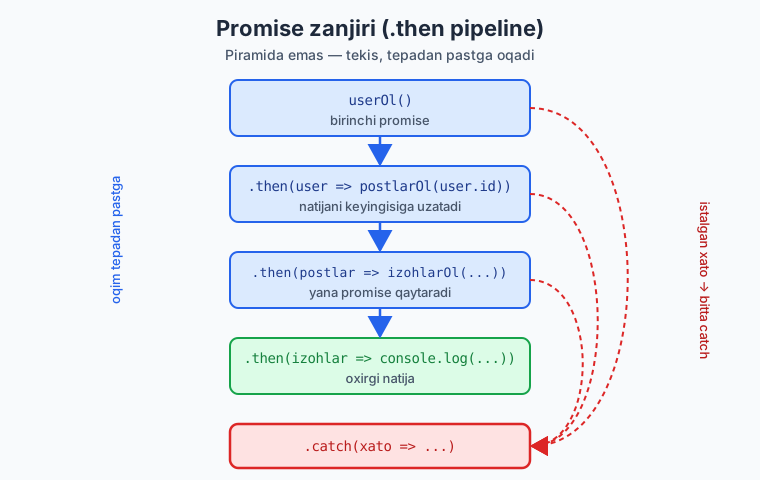
.then ichida yana promise qaytarsang, ular ketma-ket bajariladi — piramida emas, tekis zanjir:
userOl()
  .then(user => postlarOl(user.id))   // user.id ni keyingisiga uzatadi
  .then(postlar => izohlarOl(postlar[0].id))
  .then(izohlar => console.log(izohlar))
  .catch(xato => console.log("Xato:", xato)); // BITTA catch hammasini ushlaydi
Why zanjir yaxshiroq: Callback hell'dagi o'ngga qiyshayish yo'qoladi — kod tepadan pastga, o'qish oson. Eng muhimi: bitta
.catchbutun zanjirdagi har qanday xatoni ushlaydi (callbacklarda har bosqichda alohida tekshirish kerak edi).
.then ichida qiymat o'zgartirish
Har .then qaytargan qiymat keyingisiga uzatiladi:
Promise.all — bir nechtasini parallel kutish
Bir nechta promise'ni bir vaqtda ishga tushirib, hammasi tugashini kutish:
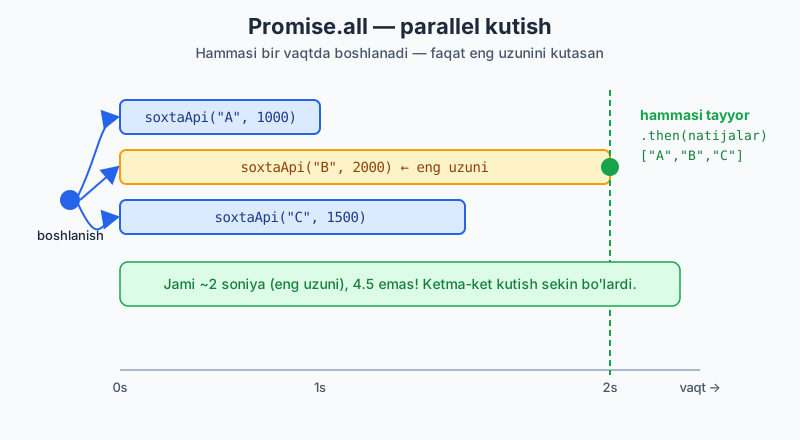
Promise.all([
  soxtaApi("A", 1000),
  soxtaApi("B", 2000),
  soxtaApi("C", 1500),
]).then(natijalar => {
  console.log(natijalar); // ["A", "B", "C"] — massiv
});
// Jami ~2 soniya (eng uzuni), 4.5 emas! Chunki PARALLEL.
Why
Promise.all: Agar 3 ta mustaqil so'rov bo'lsa, ularni ketma-ket kutish (awaitbirin-ketin) sekin — vaqtlar qo'shiladi.Promise.allhammasini bir vaqtda boshlaydi, faqat eng uzunini kutasan. Backend'ga bir nechta mustaqil so'rov yuborganda buni ishlat.
Diqqat: Promise.all — agar bittasi xato bersa, butun zanjir rad etiladi (fail-fast).
Promise.allSettled — hammasi (xato bo'lsa ham)
Hatto ba'zilari xato bersa ham, hammasining natijasini ko'rmoqchi bo'lsang:
Promise.allSettled([
  soxtaApi("A"),
  Promise.reject("Xato!"),
]).then(natijalar => {
  console.log(natijalar);
  // [{status:"fulfilled", value:"A"}, {status:"rejected", reason:"Xato!"}]
});
Promise.race — birinchi tugagani
Qaysi promise birinchi tugasa (resolve YOKI reject), o'shani oladi:
Promise.race([
  soxtaApi("Tez", 500),
  soxtaApi("Sekin", 3000),
]).then(natija => console.log(natija)); // "Tez"
Promise.racening amaliy ishlatilishi — timeout: API yoki vaqt tugashi, qaysi biri oldin kelsa:
function timeout(ms) {
  return new Promise((_, reject) =>
    setTimeout(() => reject("Vaqt tugadi"), ms)
  );
}

Promise.race([soxtaApi("data", 5000), timeout(2000)])
  .then(d => console.log(d))
  .catch(e => console.log(e)); // "Vaqt tugadi" (2s < 5s)
Eslatma:
Promise.anyham bor — birinchi muvaffaqiyatli tugaganini oladi (rejectlarni e'tiborsiz qoldiradi).raceesa birinchi tugaganni (xato bo'lsa ham) oladi.
📝 14-modul masalalari (20 ta)
Mashqlar uchun:
const kechikish = ms => new Promise(r => setTimeout(r, ms));vaconst soxtaApi = (data, ms=1000) => new Promise(r => setTimeout(() => r(data), ms));
resolvebilan oddiy Promise yarating va.thenbilan oling.rejectbilan Promise yarating va.catchbilan ushlang..then,.catch,.finallyuchchalasini ham ishlating.kechikish(ms)funksiyasini o'zingiz yozing.kechikish(1000).then(...)bilan 1 soniyadan keyin xabar chiqaring.- Shartli Promise: tasodifiy
Math.random() > 0.5bo'lsa resolve, aks holda reject. Promise.resolve(42)ni.thenbilan oling.soxtaApi({ism:"Oqil"})natijasini oling..thenzanjiri:5ni olib,*2,+1, keyin chiqaring..thenichida yangi promise qaytarib, zanjir hosil qiling.Promise.allbilan 3 tasoxtaApini parallel oling.Promise.allda bittasi reject bo'lsa nima bo'ladi — sinab ko'ring.Promise.racebilan tez va sekin orasidan tezni oling.Promise.allSettledbilan muvaffaqiyat + xatoni birga oling.- Zanjirning o'rtasida xato tashlab (
throw), oxirgi.catchda ushlang. - Promise zanjirida user → postlar → natijani uzating (callback hell'siz).
timeout(ms)funksiyasi yozing (ms dan keyin reject qiladigan).Promise.race([soxtaApi(..5000..), timeout(2000)])bilan timeout patternini quring.- Ketma-ket (sequential) 3 ta promise: birini kutib, keyingisini boshlang.
- Murakkab: 3 ta foydalanuvchini (
soxtaApi) parallel olib, ularning ismlarini bitta massivga yig'ing.
► Yechimlar
const kechikish = ms => new Promise(r => setTimeout(r, ms));
const soxtaApi = (data, ms = 1000) => new Promise(r => setTimeout(() => r(data), ms));

// 1
new Promise(resolve => resolve("OK")).then(x => console.log(x));

// 2
new Promise((_, reject) => reject("Xato")).catch(e => console.log(e));

// 3
soxtaApi("data")
  .then(d => console.log("then:", d))
  .catch(e => console.log("catch:", e))
  .finally(() => console.log("finally"));

// 4
function kechikish4(ms) {
  return new Promise(resolve => setTimeout(resolve, ms));
}

// 5
kechikish(1000).then(() => console.log("1 soniya o'tdi"));

// 6
new Promise((resolve, reject) => {
  Math.random() > 0.5 ? resolve("Omad") : reject("Omadsizlik");
}).then(x => console.log(x)).catch(e => console.log(e));

// 7 -> 42
Promise.resolve(42).then(x => console.log(x));

// 8
soxtaApi({ ism: "Oqil" }).then(u => console.log(u));

// 9 -> 11
soxtaApi(5).then(x => x * 2).then(x => x + 1).then(x => console.log(x));

// 10
soxtaApi(1)
  .then(x => soxtaApi(x + 10))
  .then(x => console.log(x)); // 11

// 11
Promise.all([soxtaApi("A"), soxtaApi("B"), soxtaApi("C")])
  .then(r => console.log(r)); // ["A","B","C"]

// 12 -> butun all reject bo'ladi
Promise.all([soxtaApi("A"), Promise.reject("Xato")])
  .then(r => console.log(r))
  .catch(e => console.log("all xato:", e)); // "all xato: Xato"

// 13 -> "Tez"
Promise.race([soxtaApi("Tez", 500), soxtaApi("Sekin", 2000)])
  .then(r => console.log(r));

// 14
Promise.allSettled([soxtaApi("A"), Promise.reject("E")])
  .then(r => console.log(r));

// 15
soxtaApi(5)
  .then(x => { if (x === 5) throw new Error("5 bo'lmasin"); return x; })
  .then(x => console.log(x))
  .catch(e => console.log("Ushlandi:", e.message));

// 16
const userOl = () => soxtaApi({ id: 1 });
const postlarOl = id => soxtaApi([`post-${id}`]);
userOl()
  .then(user => postlarOl(user.id))
  .then(postlar => console.log(postlar))
  .catch(e => console.log(e));

// 17
function timeout(ms) {
  return new Promise((_, reject) => setTimeout(() => reject("Vaqt tugadi"), ms));
}

// 18
Promise.race([soxtaApi("data", 5000), timeout(2000)])
  .then(d => console.log(d))
  .catch(e => console.log(e)); // "Vaqt tugadi"

// 19 — ketma-ket
soxtaApi("1", 500)
  .then(r => { console.log(r); return soxtaApi("2", 500); })
  .then(r => { console.log(r); return soxtaApi("3", 500); })
  .then(r => console.log(r));

// 20
Promise.all([
  soxtaApi({ ism: "Ali" }),
  soxtaApi({ ism: "Vali" }),
  soxtaApi({ ism: "Hasan" }),
]).then(users => {
  const ismlar = users.map(u => u.ism);
  console.log(ismlar); // ["Ali","Vali","Hasan"]
});
15-MODUL: async / await
async/await nima?
async/await — Promise'larni ishlatishning zamonaviy va toza usuli. U Promise ustiga "shirin qobiq" (syntactic sugar) — asinxron kodni sinxrondek o'qishga imkon beradi.
// Promise (.then bilan):
function ol() {
  soxtaApi("data").then(d => console.log(d));
}

// async/await bilan (xuddi shu, lekin tozaroq):
async function ol() {
  const d = await soxtaApi("data");
  console.log(d);
}
await — natijani "kutish"
await Promise tugashini kutadi va natijasini qaytaradi. Kod xuddi pastga oqayotgandek o'qiladi:
async function malumot() {
  console.log("Boshlandi");
  const user = await soxtaApi({ ism: "Oqil" }); // promise tugashini kutadi
  console.log(user.ism); // "Oqil"
  console.log("Tugadi");
}
Ikki muhim qoida:
- await faqat async funksiya ichida ishlaydi.
- async funksiya doim Promise qaytaradi (sen return qilgan qiymat avtomatik Promise'ga o'raladi).
async function son() {
  return 42; // aslida Promise<42> qaytaradi
}
son().then(x => console.log(x)); // 42
Xatoni try/catch bilan ushlash
Promise'dagi .catch o'rniga, async/awaitda oddiy try/catch ishlatasan:
async function malumot() {
  try {
    const data = await soxtaApi("data");
    console.log(data);
  } catch (xato) {
    console.log("Xato yuz berdi:", xato);
  } finally {
    console.log("Tozalash");
  }
}
Why try/catch yaxshiroq: Bu — oddiy sinxron koddagidek xato boshqaruvi.
.then().catch()zanjiridan ko'ra tabiiyroq va bir nechtaawaitni bittatryblokida o'rab olasan.
Callback hell → async/await (taqqoslash)
Eslab ko'r, 13-modulda callback hell shunday edi:
userOl((user) => {
  postlarOl(user.id, (postlar) => {
    izohlarOl(postlar[0].id, (izohlar) => {
      console.log(izohlar);
    });
  });
});
async/await bilan bir xil mantiq, lekin tekis va o'qilishi oson:
async function hammasi() {
  const user = await userOl();
  const postlar = await postlarOl(user.id);
  const izohlar = await izohlarOl(postlar[0].id);
  console.log(izohlar);
}
Mana shu — async dunyodagi eng katta yutuq. Bir xil ish, lekin sinxron koddek o'qiladi.
⚠️ Ketma-ket vs Parallel (eng ko'p uchraydigan xato)
// ❌ SEKIN — ketma-ket (jami ~3 soniya):
async function sekin() {
  const a = await soxtaApi("A", 1000);
  const b = await soxtaApi("B", 1000);
  const c = await soxtaApi("C", 1000);
  return [a, b, c];
}

// ✅ TEZ — parallel (jami ~1 soniya):
async function tez() {
  const [a, b, c] = await Promise.all([
    soxtaApi("A", 1000),
    soxtaApi("B", 1000),
    soxtaApi("C", 1000),
  ]);
  return [a, b, c];
}
Why diqqat (juda muhim): So'rovlar bir-biriga bog'liq bo'lmasa (B uchun A ning natijasi kerak emas),
awaitni ketma-ket yozma — vaqt behuda ketadi.Promise.allbilan parallel ishlat. Faqat keyingisi avvalgisining natijasiga bog'liq bo'lsa, ketma-ketawaitto'g'ri.
async arrow funksiya
for loop ichida await
async function ketmaKet() {
  const idlar = [1, 2, 3];
  for (const id of idlar) {
    const data = await soxtaApi(`user-${id}`);
    console.log(data); // birin-ketin
  }
}
.map + async (parallel)
.map ichida await ishlatsang, massiv Promise'lar massivini qaytaradi — Promise.all bilan o'rab ol:
async function parallel() {
  const idlar = [1, 2, 3];
  const natijalar = await Promise.all(
    idlar.map(id => soxtaApi(`user-${id}`))
  );
  console.log(natijalar); // hammasi parallel
}
📝 15-modul masalalari (20 ta)
Yana:
const soxtaApi = (data, ms=1000) => new Promise(r => setTimeout(() => r(data), ms));
asyncfunksiya yozing, ichidaawait soxtaApi(...)natijasini chiqaring.asyncfunksiyareturn 42qilsa, uni.thenbilan oling (Promise qaytarishini ko'rsating).await kechikish(1000)bilan 1 soniya kutib, keyin xabar chiqaring.try/catchbilan reject bo'lgan promise'ni ushlang.try/catch/finallyuchchalasini ishlating.soxtaApi({ism:"Oqil"})natijasidan.ismniawaitbilan oling.- Ikki
awaitni ketma-ket yozing (biri tugagach ikkinchisi). - Birinchi
awaitnatijasini ikkinchisiga uzating (bog'liq). asyncarrow funksiya yozing.for...ofichidaawaitbilan 3 ta so'rovni ketma-ket bajaring.Promise.all+awaitbilan 3 ta so'rovni parallel bajaring.- Vaqt farqi: xuddi shu 3 so'rovni ketma-ket va parallel yozib, qaysi tezroq — izohlang.
throw new Error(...)bilan xato tashlab,catchda.messageni oling..map+Promise.allbilan idlar massividan parallel natija oling.- Shartli
await: agarx > 0bo'lsa so'rov yuboring, aks holda yo'q. asyncfunksiyani boshqaasyncfunksiya ichidaawaitqiling.catchichida xatoni qayta tashlang (throw) va tashqarida ushlang.- Timeout:
Promise.race([soxtaApi(..3000..), timeout(1000)])niawaitqiling. - Loading holatini boshqaring:
trydan oldinloading=true,finallydafalse. - Murakkab:
[1,2,3]idlar uchun foydalanuvchilarni parallel olib, har biriningismini chiqaring, va biror xato bo'lsa butun jarayonnitry/catchda ushlang.
► Yechimlar
const kechikish = ms => new Promise(r => setTimeout(r, ms));
const soxtaApi = (data, ms = 1000) => new Promise(r => setTimeout(() => r(data), ms));
const timeout = ms => new Promise((_, rej) => setTimeout(() => rej(new Error("Vaqt tugadi")), ms));

// 1
async function f1() {
  const d = await soxtaApi("data");
  console.log(d);
}
f1();

// 2 -> 42
async function f2() { return 42; }
f2().then(x => console.log(x));

// 3
async function f3() {
  await kechikish(1000);
  console.log("1 soniya o'tdi");
}
f3();

// 4
async function f4() {
  try {
    await Promise.reject("Xato!");
  } catch (e) {
    console.log("Ushlandi:", e);
  }
}
f4();

// 5
async function f5() {
  try { await soxtaApi("ok"); console.log("ok"); }
  catch (e) { console.log(e); }
  finally { console.log("finally"); }
}
f5();

// 6
async function f6() {
  const u = await soxtaApi({ ism: "Oqil" });
  console.log(u.ism);
}
f6();

// 7
async function f7() {
  const a = await soxtaApi("A", 500);
  const b = await soxtaApi("B", 500);
  console.log(a, b);
}
f7();

// 8
async function f8() {
  const user = await soxtaApi({ id: 5 });
  const postlar = await soxtaApi([`post-${user.id}`]);
  console.log(postlar);
}
f8();

// 9
const f9 = async () => {
  const d = await soxtaApi("arrow");
  console.log(d);
};
f9();

// 10
async function f10() {
  for (const id of [1, 2, 3]) {
    console.log(await soxtaApi(`user-${id}`, 300));
  }
}
f10();

// 11
async function f11() {
  const r = await Promise.all([soxtaApi("A"), soxtaApi("B"), soxtaApi("C")]);
  console.log(r);
}
f11();

// 12
// Ketma-ket: 3x1000 = ~3s. Parallel (Promise.all): ~1s. Parallel tezroq,
// chunki so'rovlar bir vaqtda boshlanadi.

// 13
async function f13() {
  try { throw new Error("Maxsus xato"); }
  catch (e) { console.log(e.message); } // "Maxsus xato"
}
f13();

// 14
async function f14() {
  const r = await Promise.all([1, 2, 3].map(id => soxtaApi(`u-${id}`)));
  console.log(r);
}
f14();

// 15
async function f15(x) {
  if (x > 0) {
    const d = await soxtaApi("yuborildi");
    console.log(d);
  } else {
    console.log("So'rov yuborilmadi");
  }
}
f15(5);

// 16
async function ichki() { return await soxtaApi("ichki natija"); }
async function tashqi() {
  const r = await ichki();
  console.log(r);
}
tashqi();

// 17
async function f17() {
  try {
    try { throw new Error("birinchi"); }
    catch (e) { throw new Error("qayta: " + e.message); }
  } catch (e) { console.log(e.message); } // "qayta: birinchi"
}
f17();

// 18
async function f18() {
  try {
    const d = await Promise.race([soxtaApi("data", 3000), timeout(1000)]);
    console.log(d);
  } catch (e) { console.log(e.message); } // "Vaqt tugadi"
}
f18();

// 19
async function f19() {
  let loading = true;
  console.log("loading:", loading);
  try {
    const d = await soxtaApi("data");
    console.log(d);
  } finally {
    loading = false;
    console.log("loading:", loading);
  }
}
f19();

// 20
async function f20() {
  try {
    const users = await Promise.all(
      [1, 2, 3].map(id => soxtaApi({ id, ism: `User${id}` }))
    );
    users.forEach(u => console.log(u.ism));
  } catch (e) {
    console.log("Jarayon xatosi:", e);
  }
}
f20();
16-MODUL: Fetch API va REST
REST API nima (qisqacha)?
Backend bilan ma'lumot almashishning eng keng tarqalgan usuli — REST API. Sen serverga so'rov (request) yuborasan, u javob (response) qaytaradi. Javob odatda JSON formatida.
HTTP metodlari (CRUD):
| Metod | Maqsad | Misol |
|-------|--------|-------|
| GET | O'qish | foydalanuvchini olish |
| POST | Yaratish | yangi post qo'shish |
| PUT/PATCH | Yangilash | postni tahrirlash |
| DELETE | O'chirish | postni o'chirish |
Status kodlari (server javobining holati): | Kod | Ma'no | |-----|-------| | 200 | OK (muvaffaqiyat) | | 201 | Created (yaratildi) | | 400 | Bad Request (so'rov xato) | | 401 | Unauthorized (ruxsat yo'q) | | 404 | Not Found (topilmadi) | | 500 | Server Error (server xatosi) |
Sen backend (Laravel) yozasan — bu kodlar tanish. Frontend tomonida
response.statusorqali shularni tekshirasan.
fetch — so'rov yuborish
fetch Promise qaytaradi. Shuning uchun await yoki .then bilan ishlatamiz.
Mashqlar uchun bepul test API: https://jsonplaceholder.typicode.com (haqiqiy so'rovlar yuborsa bo'ladi).
GET (.then bilan)
fetch("https://jsonplaceholder.typicode.com/posts/1")
  .then(response => response.json()) // javobni JSON qilib o'qiymiz
  .then(data => console.log(data))
  .catch(error => console.log("Xato:", error));
GET (async/await bilan — tavsiya etiladi)
async function postOl() {
  const response = await fetch("https://jsonplaceholder.typicode.com/posts/1");
  const data = await response.json();
  console.log(data);
}
Why ikki
await: Birinchiawait fetch(...)— server javobini (headerlar, status) oladi. Ikkinchiawait response.json()— javob tanasini (body) o'qib, JSON'ga aylantiradi.response.json()ham Promise qaytaradi, shuning uchun yanaawait.
response.ok va xato boshqaruvi (muhim!)
⚠️ Tuzoq: fetch 404 yoki 500 kabi xatolarda ham .catchga tushmaydi! U faqat tarmoq uzilganda xato beradi. Server xatosini o'zing tekshirishing kerak:
async function postOl(id) {
  try {
    const response = await fetch(`https://jsonplaceholder.typicode.com/posts/${id}`);

    if (!response.ok) {
      // 404, 500 va h.k. shu yerda ushlanadi
      throw new Error(`Server xatosi: ${response.status}`);
    }

    const data = await response.json();
    return data;
  } catch (error) {
    console.log("Xato:", error.message);
  }
}
Why bu muhim: Bu — junior'lar 100% kalishadigan joy.
fetch"muvaffaqiyat" deb hisoblaydi, agar server javob bersa — javob 404 bo'lsa ham. Shuning uchunif (!response.ok) throw ...shart.response.ok— status 200-299 bo'lsatrue.
POST — ma'lumot yuborish
async function postYarat() {
  const response = await fetch("https://jsonplaceholder.typicode.com/posts", {
    method: "POST",
    headers: {
      "Content-Type": "application/json", // JSON yuborayotganimizni aytamiz
    },
    body: JSON.stringify({       // obyektni JSON matnga aylantiramiz
      title: "Yangi post",
      body: "Matn",
      userId: 1,
    }),
  });

  const data = await response.json();
  console.log(data); // server qaytargan yangi obyekt (id bilan)
}
POST/PUT uchun 3 narsa kerak:
1. method: "POST"
2. headers — "Content-Type": "application/json"
3. body: JSON.stringify(obyekt) — doim stringify qil
PUT (yangilash) va DELETE (o'chirish)
// PUT — to'liq yangilash
await fetch("https://jsonplaceholder.typicode.com/posts/1", {
  method: "PUT",
  headers: { "Content-Type": "application/json" },
  body: JSON.stringify({ id: 1, title: "Yangilangan" }),
});

// DELETE
await fetch("https://jsonplaceholder.typicode.com/posts/1", {
  method: "DELETE",
});
Query parametrlari
// userId=1 bo'lgan postlar:
const response = await fetch("https://jsonplaceholder.typicode.com/posts?userId=1");
const data = await response.json();
console.log(data.length);
Fetch + DOM (real loyiha namunasi)
<button id="yukla">Postlarni yuklash</button>
<p id="holat"></p>
<ul id="royxat"></ul>
<script>
  const holat = document.querySelector("#holat");
  const ul = document.querySelector("#royxat");

  document.querySelector("#yukla").addEventListener("click", async () => {
    holat.textContent = "Yuklanmoqda..."; // loading holati
    ul.innerHTML = "";

    try {
      const res = await fetch("https://jsonplaceholder.typicode.com/posts?_limit=5");
      if (!res.ok) throw new Error(`Xato: ${res.status}`);

      const postlar = await res.json();
      postlar.forEach(post => {
        const li = document.createElement("li");
        li.textContent = post.title;
        ul.appendChild(li);
      });
      holat.textContent = ""; // loading'ni o'chiramiz
    } catch (error) {
      holat.textContent = "Xatolik: " + error.message; // xatoni ko'rsatamiz
    }
  });
</script>
Mana bu — 3-qism (DOM, events) va 4-qism (async, fetch) ning birlashmasi. Real frontend ilovasi aynan shunday ishlaydi: tugma → loading → fetch → render → (xato bo'lsa) xabar.
📝 16-modul masalalari (20 ta)
API:
https://jsonplaceholder.typicode.com(/posts,/posts/1,/users,/comments).
fetch(.then) bilan/posts/1ni olib,response.json()qilib chiqaring.- Xuddi shuni
async/awaitbilan qayta yozing. /posts/1javobidan faqattitleni chiqaring.response.okni tekshirib,falsebo'lsathrowqiling.response.statusni konsolga chiqaring./posts(barchasi) ni olib, nechta post borligini chiqaring..mapbilan barcha postlardan faqattitlelarni ajratib oling.try/catchbilan fetch xatosini ushlang.- Mavjud bo'lmagan URL (
/postss/1) ga so'rov yuborib, xatoni ushlang (404). POSTbilan yangi post yarating (title,body,userId).- POST'da
headersvaJSON.stringify(body)ni to'g'ri qo'ying. PUTbilan/posts/1ni yangilang.DELETEbilan/posts/1ni o'chiring varesponse.statusni tekshiring.- Query param bilan
?userId=1postlarini oling. ?_limit=5bilan faqat 5 ta post oling.Promise.allbilan/posts/1va/users/1ni parallel oling.- DOM: postlarni
<ul>ichida ro'yxat qilib chiqaring. - DOM: so'rovdan oldin "Yuklanmoqda..." ko'rsatib, tugagach o'chiring.
- DOM: xato bo'lsa foydalanuvchiga ko'rinadigan xabar chiqaring.
- Murakkab:
/users/1ni va o'sha userning postlarini (/posts?userId=1) parallel olib,"<Ism> — N ta post"ko'rinishida DOM'da chiqaring.
► Yechimlar
const BASE = "https://jsonplaceholder.typicode.com";

// 1
fetch(`${BASE}/posts/1`)
  .then(res => res.json())
  .then(data => console.log(data))
  .catch(e => console.log(e));

// 2
async function f2() {
  const res = await fetch(`${BASE}/posts/1`);
  const data = await res.json();
  console.log(data);
}
f2();

// 3
async function f3() {
  const res = await fetch(`${BASE}/posts/1`);
  const data = await res.json();
  console.log(data.title);
}
f3();

// 4
async function f4() {
  const res = await fetch(`${BASE}/posts/1`);
  if (!res.ok) throw new Error(`Xato: ${res.status}`);
  console.log("OK");
}
f4();

// 5
async function f5() {
  const res = await fetch(`${BASE}/posts/1`);
  console.log(res.status); // 200
}
f5();

// 6
async function f6() {
  const res = await fetch(`${BASE}/posts`);
  const data = await res.json();
  console.log(data.length); // 100
}
f6();

// 7
async function f7() {
  const res = await fetch(`${BASE}/posts`);
  const postlar = await res.json();
  console.log(postlar.map(p => p.title));
}
f7();

// 8 & 9
async function f9() {
  try {
    const res = await fetch(`${BASE}/postss/1`); // noto'g'ri URL
    if (!res.ok) throw new Error(`Topilmadi: ${res.status}`);
    console.log(await res.json());
  } catch (e) {
    console.log("Xato ushlandi:", e.message); // 404
  }
}
f9();

// 10 & 11
async function f10() {
  const res = await fetch(`${BASE}/posts`, {
    method: "POST",
    headers: { "Content-Type": "application/json" },
    body: JSON.stringify({ title: "Yangi", body: "Matn", userId: 1 }),
  });
  console.log(await res.json()); // { id: 101, ... }
}
f10();

// 12
async function f12() {
  const res = await fetch(`${BASE}/posts/1`, {
    method: "PUT",
    headers: { "Content-Type": "application/json" },
    body: JSON.stringify({ id: 1, title: "Yangilangan", body: "...", userId: 1 }),
  });
  console.log(await res.json());
}
f12();

// 13
async function f13() {
  const res = await fetch(`${BASE}/posts/1`, { method: "DELETE" });
  console.log(res.status); // 200
}
f13();

// 14
async function f14() {
  const res = await fetch(`${BASE}/posts?userId=1`);
  console.log((await res.json()).length); // 10
}
f14();

// 15
async function f15() {
  const res = await fetch(`${BASE}/posts?_limit=5`);
  console.log((await res.json()).length); // 5
}
f15();

// 16
async function f16() {
  const [postRes, userRes] = await Promise.all([
    fetch(`${BASE}/posts/1`),
    fetch(`${BASE}/users/1`),
  ]);
  const post = await postRes.json();
  const user = await userRes.json();
  console.log(post.title, user.name);
}
f16();

// 17, 18, 19 — DOM (HTML: <button id="yukla">, <p id="holat">, <ul id="royxat">)
async function f17() {
  const holat = document.querySelector("#holat");
  const ul = document.querySelector("#royxat");
  holat.textContent = "Yuklanmoqda..."; // 18
  ul.innerHTML = "";
  try {
    const res = await fetch(`${BASE}/posts?_limit=5`);
    if (!res.ok) throw new Error(`Xato: ${res.status}`);
    const postlar = await res.json();
    postlar.forEach(p => {
      const li = document.createElement("li");
      li.textContent = p.title;
      ul.appendChild(li);
    });
    holat.textContent = "";
  } catch (e) {
    holat.textContent = "Xatolik: " + e.message; // 19
  }
}
document.querySelector("#yukla")?.addEventListener("click", f17);

// 20 — Murakkab
async function f20() {
  const royxat = document.querySelector("#royxat");
  try {
    const [userRes, postRes] = await Promise.all([
      fetch(`${BASE}/users/1`),
      fetch(`${BASE}/posts?userId=1`),
    ]);
    if (!userRes.ok || !postRes.ok) throw new Error("So'rov xatosi");

    const user = await userRes.json();
    const postlar = await postRes.json();

    const li = document.createElement("li");
    li.textContent = `${user.name} — ${postlar.length} ta post`;
    royxat.appendChild(li);
  } catch (e) {
    console.log(e.message);
  }
}
f20();
✅ 4-qism yakuni
Endi sen asinxron JS'ni tushunasan — bu frontend va backend (Node) ishining yuragi:
- Event Loop — JS qanday "kutadi" (Call Stack, microtask vs macrotask)
- Callbacks va callback hell muammosi
- Promises — .then/.catch, zanjir, Promise.all/race/allSettled
- async/await — toza, sinxrondek o'qiladigan kod + try/catch
- Fetch API — real server bilan ishlash, response.ok tuzog'i, POST/PUT/DELETE
Eng muhim 3 ta xulosa:
1. Promise (microtask) doim setTimeout (macrotask)dan oldin ishlaydi.
2. fetch xato statuslarda .catchga tushmaydi — if (!response.ok) throw shart.
3. Mustaqil so'rovlarni Promise.all bilan parallel qil, ketma-ket await qilma.
Keyingi qadam (5-qism) — Chuqur JS
Bu yerda JS'ning "ostki qavatiga" tushamiz — buni bilgan dasturchini junior'dan ajratadi:
- Scope, Closures, Hoisting — var/let nega farq qiladi, closure nima
- this — JS'ning eng chalkash mavzusi, nihoyat to'liq ochiladi
- Prototypes va inheritance — JS qanday "meros" oladi
- Classes (ES6) — zamonaviy OOP
- ES6+ — destructuring, spread, modullar, optional chaining (chuqurroq)
Maslahat: 5-qismga o'tishdan oldin 16-modulning #20-masalasini noldan yoz. Fetch + Promise.all + DOM + try/catch — bularning hammasi bitta joyda. Bu — real ish.
📚 README · ← 3-qism — Brauzer (DOM) · Keyingi: 5-qism (1-bo'lim) — Chuqur JS →