02 — Reactivity (Reaktivlik)
⬅️ Oldingi: 01 — Vue asoslari · 🏠 README · Keyingi: 03 — Komponentlar ➡️
Bu Vue'ning yuragi. Buni chuqur tushunsang, qolgan hammasi oson. Yuzaki tushunsang — "nega yangilanmayapti?" degan buglar bilan kurashasan.
Reaktivlik nima?
State o'zgarsa, unga bog'liq hamma narsa (UI, computed, watcher) avtomatik yangilanadi.
Excel analogiyasi: C1 = A1 + B1. A1 ni o'zgartirsang, C1 o'zi qayta hisoblanadi. Vue ham shunday "bog'liqliklar grafini" (dependency graph) yuritadi.
Laravel analogiyasi: Eloquent'da $user->name — oddiy property. O'zgartirsang hech narsa bo'lmaydi. Vue'da reaktiv qiymat — model observer'iga o'xshaydi: o'zgarish "kuzatiladi" va kerakli reaksiya (re-render) ishga tushadi.
2.1 ref() — birlamchi (primitiv) qiymatlar uchun
import { ref } from 'vue'

const count = ref(0)
const name = ref('Oqil')
const user = ref({ id: 1, name: 'Ali' })   // obyekt ham bo'ladi

console.log(count.value)   // 0  — .value ORQALI o'qiladi
count.value++              // o'zgartirish ham .value bilan
count.value = 10
Nega .value? JavaScript'da primitivlar (number, string, boolean) qiymat bo'yicha uzatiladi — ularni "kuzatib" bo'lmaydi. Shu sabab Vue ularni { value: ... } obyektga o'raydi. Obyektni esa Proxy bilan kuzatish mumkin.
- Template'da
.valueshart emas (Vue avtomatik ochadi/"unwrap" qiladi): <script>ichida.valuedoim kerak.
// ❌ Eng ko'p uchraydigan xato
const total = ref(0)
total = total + 5          // ref obyektni son bilan almashtiryapsan — buziladi

// ✅
total.value = total.value + 5
2.2 reactive() — faqat obyekt/massiv uchun
import { reactive } from 'vue'

const state = reactive({
  count: 0,
  user: { name: 'Ali' },
  todos: [],
})

state.count++              // .value YO'Q — to'g'ridan-to'g'ri
state.user.name = 'Vali'   // chuqur (deep) reaktiv
state.todos.push('x')
reactive — obyektni ES6 Proxy ga o'raydi. Property o'qilishi/yozilishi "tutib olinadi" (intercept) va kuzatiladi.
ref vs reactive — qaysi birini ishlatish?
ref |
reactive |
|
|---|---|---|
| Tur | Har qanday (primitiv ham, obyekt ham) | Faqat obyekt/massiv/Map/Set |
| Kirish | .value |
To'g'ridan-to'g'ri |
| Almashtirish (reassign) | x.value = newObj ✅ |
state = newObj ❌ reaktivlik yo'qoladi |
| Destructure | Reaktivlik yo'qoladi (toRefs kerak) |
Reaktivlik yo'qoladi |
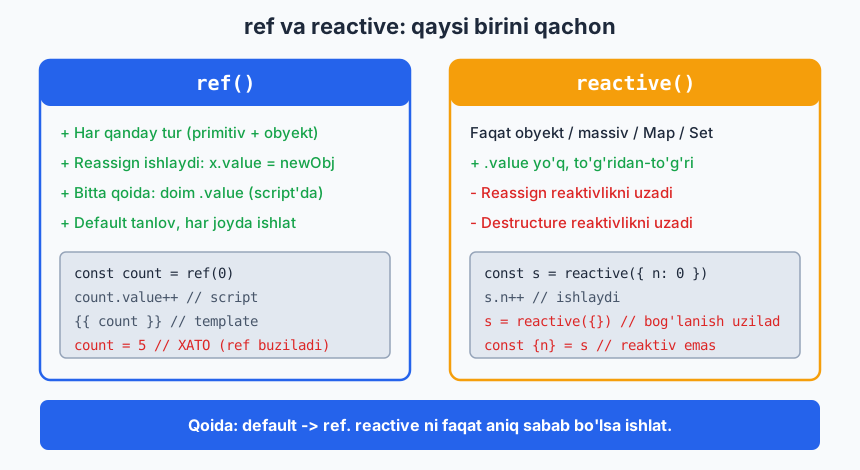
Amaliy tavsiya: Hamma joyda ref ishlat. Bitta qoidani (.value) yodda tutish, ikkita modelni aralashtirishdan oson. reactive ning cheklovlari ko'p:
// reactive muammosi 1: reassign buziladi
let state = reactive({ count: 0 })
state = reactive({ count: 5 })   // eski kuzatuvchilar ulanib qoladi — bug

// reactive muammosi 2: destructure reaktivlikni uzadi
const { count } = reactive({ count: 0 })  // count endi oddiy son, reaktiv emas

// ref bilan bunday muammo yo'q:
const count = ref(0)
count.value = 5   // har doim ishlaydi
Vue jamoasining ko'p a'zolari ham "default —
ref" deydi.reactiveni faqat aniq sabab bo'lsa ishlat.
Quyidagi diagramma ikkalasini va qaysi birini qachon ishlatishni solishtiradi:
2.3 computed() — hosilaviy (derived) qiymat
State'dan kelib chiqadigan qiymatni hisoblaydi va keshlaydi.
import { ref, computed } from 'vue'

const firstName = ref('Oqil')
const lastName = ref('Dev')

const fullName = computed(() => `${firstName.value} ${lastName.value}`)

console.log(fullName.value)   // "Oqil Dev"
firstName.value = 'Ali'
console.log(fullName.value)   // "Ali Dev" — avtomatik yangilandi
Laravel analogiyasi: computed = Eloquent accessor (getFullNameAttribute). Bog'liq atributlardan hosilaviy qiymat. Farqi — Vue'da u keshlanadi.
Computed vs Method — MUHIM
<script setup>
import { ref, computed } from 'vue'
const list = ref([1, 2, 3, 4, 5])

// computed — keshlanadi
const evenComputed = computed(() => list.value.filter(n => n % 2 === 0))

// method — har render'da QAYTA ishlaydi
function evenMethod() { return list.value.filter(n => n % 2 === 0) }
</script>

<template>
  {{ evenComputed }}   <!-- bog'liqlik (list) o'zgarmaguncha qayta hisoblanMAYDI -->
  {{ evenMethod() }}   <!-- har re-render'da qayta ishlaydi -->
</template>
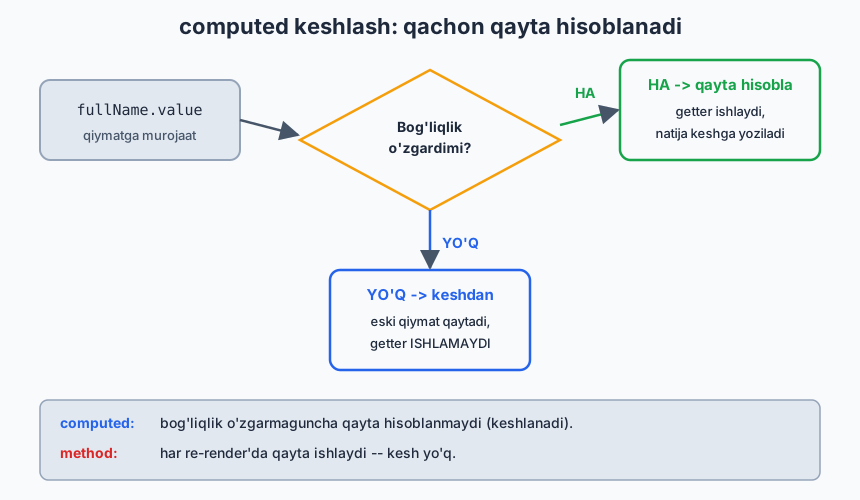
computed bog'liqliklarini (list) kuzatadi. Ular o'zgarmasa — keshdagi qiymatni qaytaradi, qayta hisoblamaydi. Og'ir hisob-kitoblar uchun bu katta tejamkorlik.
Quyidagi diagramma keshlash mantig'ini ko'rsatadi — qachon qayta hisoblanadi, qachon keshdan oladi:
Writable computed (get/set)
const fullName = computed({
  get: () => `${firstName.value} ${lastName.value}`,
  set: (val) => {
    [firstName.value, lastName.value] = val.split(' ')
  }
})
fullName.value = 'Yangi Ism'   // set ishga tushadi
Computed qoidalari
- Sof (pure) bo'lsin: faqat hisoblab qaytarsin, side-effect (API chaqirish, state o'zgartirish) qilmasin.
- Argument qabul qilmaydi. Parametr kerak bo'lsa —
computedfunksiya qaytarsin yoki method ishlat.
2.4 watch() — o'zgarishga reaksiya (side-effect)
computed qiymat qaytaradi. watch esa o'zgarishga harakat qiladi (API, localStorage, log...).
import { ref, watch } from 'vue'

const query = ref('')

watch(query, (newVal, oldVal) => {
  console.log(`${oldVal} → ${newVal}`)
  // masalan: API qidiruv
})

// Bir nechta manbani kuzatish
watch([firstName, lastName], ([newF, newL], [oldF, oldL]) => { ... })

// reactive obyekt property'sini kuzatish — getter funksiya bilan
watch(() => state.count, (newCount) => { ... })
watch opsiyalari
watch(source, callback, {
  immediate: true,   // komponent yuklanganda darrov bir marta ishga tushsin
  deep: true,        // obyekt ichidagi har qanday o'zgarishni kuzat (chuqur)
  once: true,        // faqat bir marta (Vue 3.4+)
})
deep haqida: ref ichidagi obyektning ichki property'si o'zgarsa, oddiy watch ko'rmasligi mumkin. Chuqur kuzatish kerak bo'lsa deep: true. Lekin u qimmat — katta obyektlarda ehtiyot bo'l. Ko'pincha aniq property'ni getter bilan kuzatish (() => state.user.name) yaxshiroq.
2.5 watchEffect() — bog'liqliklarni avtomatik aniqlaydi
watch da manbani aniq ko'rsatasan. watchEffect da esa — funksiya ichida ishlatilgan hamma reaktiv qiymat avtomatik bog'liqlikka aylanadi.
import { ref, watchEffect } from 'vue'

const userId = ref(1)

watchEffect(() => {
  // userId ishlatilgani uchun u avtomatik kuzatiladi
  console.log(`User ${userId.value} ni yuklash...`)
  fetchUser(userId.value)
})
// Darrov bir marta ishlaydi (immediate kabi), keyin userId har o'zgarganda qayta
watch vs watchEffect
watch |
watchEffect |
|
|---|---|---|
| Bog'liqlik | Aniq ko'rsatiladi | Avtomatik aniqlanadi |
| Eski qiymat | Bor (oldVal) |
Yo'q |
| Boshlang'ich ishga tushish | Default yo'q (immediate bilan) |
Doim darrov ishlaydi |
| Qachon | Aniq manbaga reaksiya, eski qiymat kerak | Bir nechta manbaga bog'liq side-effect |
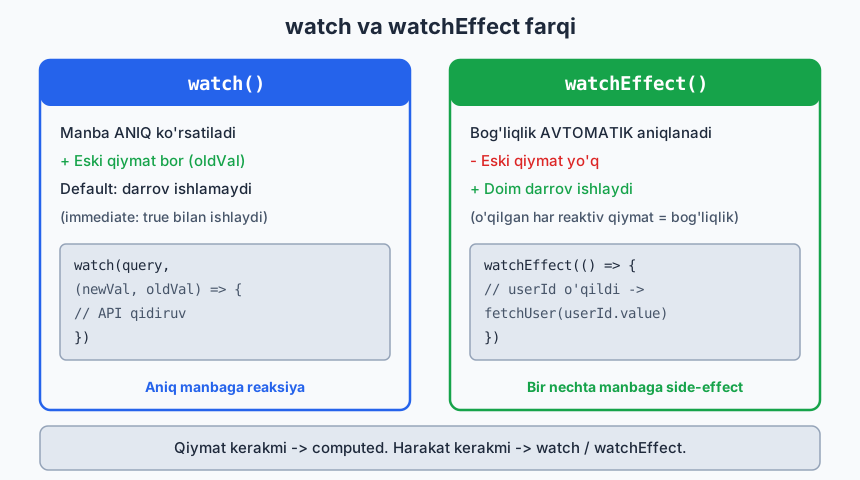
Quyidagi diagramma ikkalasining farqini yonma-yon ko'rsatadi:
Cleanup (tozalash)
watch(id, async (newId, oldId, onCleanup) => {
  const controller = new AbortController()
  onCleanup(() => controller.abort())   // oldingi so'rovni bekor qil (race condition)
  await fetch(`/api/x/${newId}`, { signal: controller.signal })
})
2.6 Reaktivlik ICHKI mexanizmi (nega ishlaydi)
Buni bilish — debugging'ni osonlashtiradi:
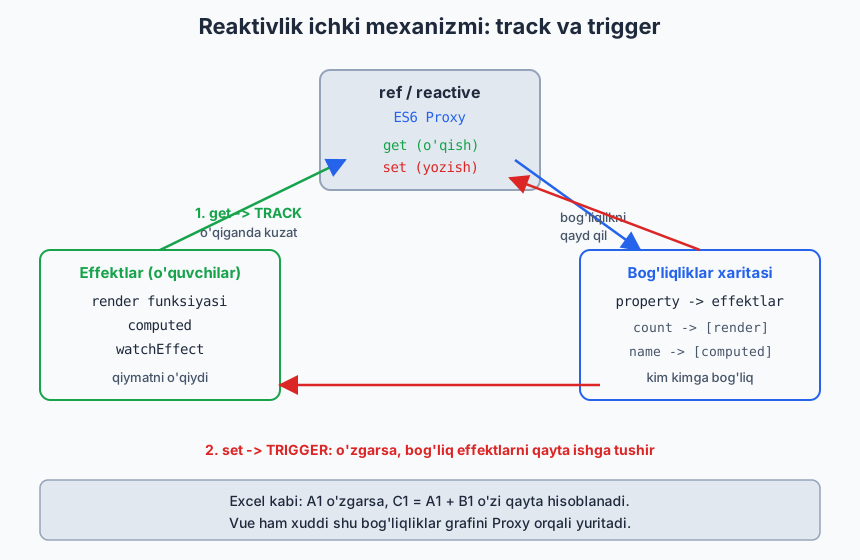
- Track (kuzatish): Komponent render bo'lganda yoki
computed/watchEffectishlaganda, ular o'qigan har bir reaktiv property "bu effekt menga bog'liq" deb belgilanadi (Proxygettrap orqali). - Trigger (qo'zg'atish): Property o'zgarganda (Proxy
settrap), Vue o'sha propertyga bog'liq hamma effektni qayta ishga tushiradi.
[reactive obyekt] --get--> kim o'qiyapti? --> bog'liqlikni qayd qil
                  --set--> o'zgardi! --> bog'liq effektlarni qayta ishga tushir
Quyidagi diagramma bu ichki mexanizmni (track va trigger) ko'rsatadi:
Bundan kelib chiqadigan muhim cheklovlar:
// ❌ Yangi property qo'shish (reactive obyektda eski Vue'larda muammo edi, Vue 3 Proxy bunda yaxshi, lekin ref afzal)
// ❌ Destructure reaktivlikni uzadi:
const { count } = reactive({ count: 0 })   // count — oddiy son
// ✅ toRefs bilan saqlash:
import { toRefs } from 'vue'
const state = reactive({ count: 0, name: 'x' })
const { count, name } = toRefs(state)   // count.value, name.value — reaktiv qoladi
2.7 Foydali reactivity yordamchilari
import { toRef, toRefs, unref, isRef, toRaw } from 'vue'

isRef(x)        // x ref'mi?
unref(x)        // ref bo'lsa .value, bo'lmasa o'zini qaytaradi (x?.value ?? x)
toRaw(proxy)    // Proxy'dan asl obyektni oladi (kuzatuvsiz)
toRef(obj,'k')  // obyekt property'sidan ref yasaydi (bog'lanish saqlanadi)
toRefs(obj)     // butun obyektni ref'lar obyektiga aylantiradi
Advanced (kerak bo'lganda):
- shallowRef — faqat .value almashishini kuzatadi, ichini emas (katta obyektlar uchun performance).
- readonly — o'zgartirib bo'lmaydigan reaktiv nusxa.
- markRaw — obyektni reaktiv qilmaslikni belgilaydi (masalan, 3rd-party class instansiyasi).
Xulosa
ref— default tanlov, hammasi uchun,.value(script'da)reactive— faqat obyekt, cheklovlari ko'p, ehtiyotkorlik bilancomputed— hosilaviy + keshlangan qiymat (Eloquent accessor kabi)watch— aniq manbaga reaksiya, eski qiymat borwatchEffect— avtomatik bog'liqlik, doim darrov- Reaktivlik = Proxy
get(track) +set(trigger) - Destructure reaktivlikni uzadi →
toRefs
Oltin qoida: Qiymat kerakmi → computed. Harakat kerakmi → watch.
🎯 Masalalar (kamida 22 ta)
ref / reactive (1–6)
price(ref) vaqty(ref) bo'lsin.totalni computed qilib chiqar (price*qty).reactive({ x:0, y:0 })ob'yektini yarat, ikki tugmaxvayni oshirsin, ekranda ko'rsat.- Yuqoridagi reactive obyektni
const { x } = stateqilib destructure qil — nega yangilanmayapti? Tushuntir vatoRefsbilan tuzat. refichida obyekt:const user = ref({ name:'', age:0 }). Inputlardan name/age yangilansin (.value.name).- ❓
count = ref(0); count = count + 1nega xato? Kodga izoh yozib to'g'rila. reactivemassiv:state.itemsga element qo'shish/o'chirish tugmalari (push,filter).
computed (7–13)
- Full name:
firstName,lastName→fullNamecomputed. - Writable computed (★):
fullNameget/set bilan; bitta inputga to'liq ism yozilsa,firstName/lastNameajralib saqlansin. - Filtr: Mahsulotlar massivi +
minPrice(ref).filteredcomputed faqatprice >= minPricelarni qaytarsin. - Saralash (★): Massivni
asc/desctoggle qiluvchi tugma;sortedcomputed mos saralasin (asl massivni mutatsiya qilmasdan —[...arr].sort()). - Statistika: Sonlar massividan
sum,avg,max,minni 4 ta computed qilib chiqar. - Computed vs method (★): Bir xil og'ir hisob-kitobni computed va method qilib yoz,
console.logqo'yib, qaysi biri kamroq chaqirilishini kuzat. Xulosani yoz. - Savat (★):
[{name,price,qty}]savat.subtotal(har element),grandTotal,itemCountcomputed bo'lsin.
watch / watchEffect (14–20)
- Logger:
name(ref) o'zgarsa, eski→yangi qiymatniconsole.logqil. - localStorage sync (★):
themeref'iniwatchqiliblocalStoragega saqla; sahifa ochilganda undan o'qib boshlang'ich qiymat qil. - immediate:
watchgaimmediate:trueber, komponent yuklanganda darrov ishlashini ko'rsat. - deep (★):
ref({user:{name}}). Oddiywatchichki o'zgarishni ko'rmasligini,deep:trueko'rishini namoyish qil. - watchEffect:
a,bref'lariga bog'liqwatchEffect; ikkalasidan biri o'zgarsa qayta ishlasin. Keyin shuniwatch([a,b])ga aylantir — farqni yoz. - Debounced search (★★): Qidiruv inputi.
watchichidasetTimeout+onCleanupbilan oldingi timer'ni tozalab, 400ms kechikish bilan "qidiruv yuborildi" deb log qil. - Race condition (★★):
userId(ref) o'zgarsa "API" (setTimeout bilan soxta) chaqir;onCleanuporqali eski so'rovni bekor qilib, faqat oxirgisi natija berishini ta'minla.
Aralash loyiha (21–25)
- Konvertor (★): Som ↔ Dollar. Bir inputga som yozsang dollar chiqsin va aksincha (2 ta writable computed yoki watch).
- Parol kuchi (★): Parol inputi.
computedbilan kuch darajasini hisobla (uzunlik, raqam, katta harf, belgi) va rangli indikator ko'rsat. - To-Do v1 (★★): 01-moduldagi To-Do'ni yaxshila:
activeCount/completedCountcomputed,filter(all/active/done) computed, ro'yxatnilocalStoragegawatch(deep)bilan saqla. - Forma validatsiya (★★): Email + parol. Har biri uchun computed xato xabari (
isEmailValid,isPasswordValid);canSubmitcomputed ikkalasi to'g'ri bo'lsaginatrue. - Real-time filter+sort+search (★★★): Mahsulotlar jadvali: qidiruv (matn), kategoriya filtri, narx bo'yicha saralash — uchalasi bitta
displayProductscomputed orqali zanjir bilan birlashsin.
✅ Tanlangan yechimlar
8 — Writable computed
<script setup>
import { ref, computed } from 'vue'
const firstName = ref('Oqil')
const lastName = ref('Dev')

const fullName = computed({
  get: () => `${firstName.value} ${lastName.value}`,
  set: (val) => {
    const parts = val.trim().split(/\s+/)
    firstName.value = parts[0] ?? ''
    lastName.value = parts.slice(1).join(' ')
  },
})
</script>

<template>
  <input :value="fullName" @input="fullName = $event.target.value">
  <p>Ism: {{ firstName }} | Familiya: {{ lastName }}</p>
</template>
19 — Debounced search
<script setup>
import { ref, watch } from 'vue'
const query = ref('')

watch(query, (val, _old, onCleanup) => {
  const timer = setTimeout(() => {
    console.log('Qidiruv yuborildi:', val)   // bu yerda API
  }, 400)
  onCleanup(() => clearTimeout(timer))        // tez yozilsa oldingisini bekor qil
})
</script>

<template>
  <input :value="query" @input="query = $event.target.value" placeholder="Qidiruv...">
</template>
25 — Filter + sort + search zanjiri
<script setup>
import { ref, computed } from 'vue'
const products = ref([
  { id:1, name:'Laptop', cat:'tech', price:1200 },
  { id:2, name:'Olma', cat:'food', price:5 },
  { id:3, name:'Telefon', cat:'tech', price:800 },
])
const search = ref('')
const category = ref('all')
const sortDir = ref('asc')

const displayProducts = computed(() => {
  let list = products.value
  // 1) search
  if (search.value) {
    const q = search.value.toLowerCase()
    list = list.filter(p => p.name.toLowerCase().includes(q))
  }
  // 2) category
  if (category.value !== 'all') {
    list = list.filter(p => p.cat === category.value)
  }
  // 3) sort (nusxa olib — asl massivni buzmaymiz)
  return [...list].sort((a, b) =>
    sortDir.value === 'asc' ? a.price - b.price : b.price - a.price
  )
})
</script>

<template>
  <input :value="search" @input="search = $event.target.value" placeholder="Qidiruv...">
  <button @click="sortDir = sortDir === 'asc' ? 'desc' : 'asc'">
    Narx: {{ sortDir }}
  </button>
  <ul>
    <li v-for="p in displayProducts" :key="p.id">{{ p.name }} — ${{ p.price }}</li>
  </ul>
</template>
➡️ Keyingi: 03 — Komponentlar