01 — Vue asoslari va Template Syntax
🏠 README / Mundarija · Keyingi: 02 — Reactivity ➡️
Vue nima va nega kerak?
Klassik yondashuvda (jQuery/vanilla JS) sen DOM'ni qo'lda o'zgartirasan: document.querySelector(...).textContent = .... Ma'lumot ko'payganda bu kod chalkashadi, bug ko'payadi.
Vue deklarativ: sen "natija qanday ko'rinishi kerak"ligini aytasan, DOM'ni yangilashni Vue o'zi qiladi.
State (ma'lumot) o'zgardi → Vue kerakli DOM qismini avtomatik yangilaydi. Sen DOM'ga tegmaysan.
Quyidagi diagramma bu g'oyani ko'rsatadi: ko'rinish — holatning natijasi.
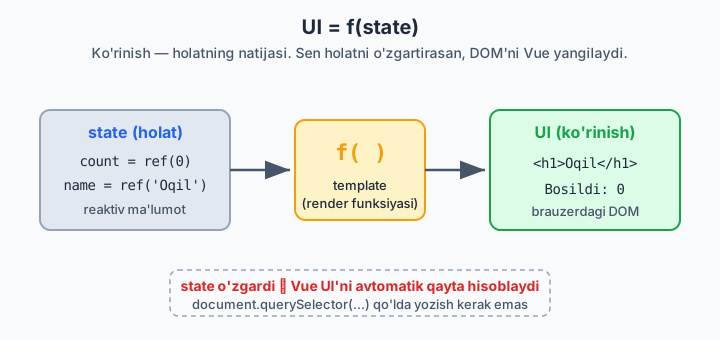
Laravel analogiyasi: Blade'da {{ $user->name }} yozasan, controller'dan kelgan data render bo'ladi — lekin Blade bir marta server'da render bo'lib tugaydi. Vue esa brauzerda uzluksiz ishlaydi: name o'zgarsa, sahifa qayta yuklanmasdan ekrandagi qiymat yangilanadi. Bu — reaktivlik.
1.1 Birinchi Vue ilovasi (CDN — tushunish uchun)
Build tool'siz, faqat tushunish uchun:
<!DOCTYPE html>
<html>
<head>
  <script src="https://unpkg.com/vue@3/dist/vue.global.js"></script>
</head>
<body>
  <div id="app">
    <h1>{{ message }}</h1>
    <button @click="count++">Bosildi: {{ count }}</button>
  </div>

  <script>
    const { createApp, ref } = Vue

    createApp({
      setup() {
        const message = ref('Salom Vue!')
        const count = ref(0)
        return { message, count }   // template'ga ochiladi
      }
    }).mount('#app')
  </script>
</body>
</html>
Tushunchalar:
- createApp(...) — ilova instansiyasi (Laravel'da $app kabi root).
- .mount('#app') — ilovani DOM'dagi #app elementiga "ulaydi".
- ref(0) — reaktiv qiymat. count.value o'zgarsa, template yangilanadi.
- {{ }} — interpolation (Blade'dagi {{ }} bilan deyarli bir xil ko'rinish).
- @click — event listener (pastda batafsil).
CDN faqat o'rganish uchun. Real loyihada Vite + SFC ishlatamiz.
1.2 Real setup: Vite + SFC
npm create vue@latest
# Project name: my-app
# TypeScript? — Yes (tavsiya, lekin xohlasang No)
# Router/Pinia/Vitest — keyin qo'shamiz, hozir No
cd my-app
npm install
npm run dev
SFC (Single File Component) — .vue fayl
Bitta faylda 3 ta blok: template, logika, stil:
<script setup>
import { ref } from 'vue'

const message = ref('Salom Vue!')
const count = ref(0)
</script>

<template>
  <h1>{{ message }}</h1>
  <button @click="count++">Bosildi: {{ count }}</button>
</template>

<style scoped>
button { padding: 8px 16px; }
</style>
<script setup> — Composition API'ning eng qisqa ko'rinishi. setup() funksiya yozish, return qilish shart emas — top-level e'lon qilingan hamma narsa avtomatik template'ga ochiladi.
Bitta .vue faylda uchala blok qanday joylashishini quyida ko'rishingiz mumkin.
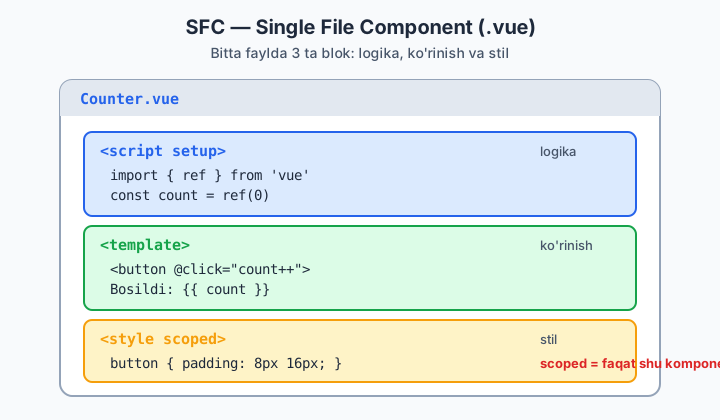
scoped — stil faqat shu komponentga ta'sir qiladi (CSS leak bo'lmaydi). Laravel'da component-level encapsulation kabi.
Bundan keyin hamma misol
<script setup>uslubida bo'ladi — bu zamonaviy standart.
1.3 Template syntax — Interpolation
<script setup>
import { ref } from 'vue'
const name = ref('Oqil')
const rawHtml = ref('<b>qalin</b>')
</script>

<template>
  <!-- Text -->
  <p>Ism: {{ name }}</p>

  <!-- JS ifoda ishlaydi (statement EMAS) -->
  <p>{{ name.toUpperCase() }}</p>
  <p>{{ name.length > 3 ? 'uzun' : 'qisqa' }}</p>

  <!-- Raw HTML — XSS xavfi! Faqat ishonchli data uchun -->
  <p v-html="rawHtml"></p>
</template>
Qoidalar:
- {{ }} ichida ifoda (expression) bo'ladi, statement emas. {{ if (x) {...} }} — XATO. {{ x ? a : b }} — to'g'ri.
- v-html — HTML'ni render qiladi, lekin XSS xavfli. Foydalanuvchi kiritgan datada hech qachon ishlatma.
1.4 Direktivalar (Directives)
Direktiva — v- bilan boshlanadigan maxsus atribut. DOM'ga reaktiv xulq beradi.
v-bind — atributni bog'lash
<script setup>
import { ref } from 'vue'
const url = ref('https://ioqil.uz')
const isDisabled = ref(true)
const imgSrc = ref('/logo.png')
</script>

<template>
  <a v-bind:href="url">Link</a>

  <!-- Qisqartma: : -->
  <a :href="url">Link</a>
  <img :src="imgSrc" :alt="`Rasm: ${url}`">
  <button :disabled="isDisabled">Tugma</button>

  <!-- Bir nechta atributni obyekt bilan -->
  <div v-bind="{ id: 'box', class: 'card' }"></div>
</template>
:href— buv-bind:hrefning qisqartmasi. Real kodda doim qisqartma ishlatiladi.
v-if / v-else-if / v-else — shartli render
<script setup>
import { ref } from 'vue'
const role = ref('admin')
</script>

<template>
  <div v-if="role === 'admin'">Admin panel</div>
  <div v-else-if="role === 'editor'">Editor panel</div>
  <div v-else>Mehmon</div>

  <!-- <template> — ko'rinmas o'rovchi (DOM'da ortiqcha element qoldirmaydi) -->
  <template v-if="role === 'admin'">
    <h2>Sarlavha</h2>
    <p>Bir nechta element, ortiqcha div'siz</p>
  </template>
</template>
v-show — ko'rsatish/yashirish
v-if vs v-show — muhim farq:
v-if |
v-show |
|
|---|---|---|
| Mexanizm | Elementni DOM'dan o'chiradi/qo'shadi | display: none qiladi (DOM'da qoladi) |
| Boshlang'ich xarajat | Past (false bo'lsa render qilinmaydi) | Yuqori (har doim render bo'ladi) |
| Toggle xarajati | Yuqori | Past |
| Qachon | Kamdan-kam o'zgaradigan shart | Tez-tez toggle bo'ladigan (masalan, dropdown) |
v-for — ro'yxat render qilish
<script setup>
import { ref } from 'vue'
const users = ref([
  { id: 1, name: 'Ali' },
  { id: 2, name: 'Vali' },
])
const obj = ref({ a: 1, b: 2 })
</script>

<template>
  <!-- key DOIM kerak (unique, barqaror) -->
  <ul>
    <li v-for="user in users" :key="user.id">
      {{ user.name }}
    </li>
  </ul>

  <!-- index bilan -->
  <li v-for="(user, index) in users" :key="user.id">
    {{ index + 1 }}. {{ user.name }}
  </li>

  <!-- obyekt bo'yicha -->
  <li v-for="(value, key) in obj" :key="key">
    {{ key }}: {{ value }}
  </li>

  <!-- range -->
  <span v-for="n in 5" :key="n">{{ n }} </span>
</template>
:key nega shart? Vue ro'yxat o'zgarganda elementlarni qayta tartiblamasdan, faqat o'zgarganini yangilash uchun key orqali har bir elementni "taniydi". keysiz yoki key="index" bilan — input fokus yo'qolishi, animatsiya xatosi kabi buglar chiqadi. Doim barqaror, unique key (odatda DB id) ber.
Eslatma: v-if va v-for ni bir elementda ishlatma — bu anti-pattern (priority chalkashadi). Buning o'rniga:
<!-- YOMON -->
<li v-for="u in users" v-if="u.active" :key="u.id">...</li>

<!-- YAXSHI: computed bilan filtrlash (02-modulda) -->
<li v-for="u in activeUsers" :key="u.id">...</li>
v-on — event tinglash
<script setup>
import { ref } from 'vue'
const count = ref(0)

function handleClick(event) {
  console.log(event.target)
  count.value++
}
</script>

<template>
  <!-- To'liq shakl -->
  <button v-on:click="count++">+</button>

  <!-- Qisqartma: @ -->
  <button @click="count++">+</button>
  <button @click="handleClick">Method bilan</button>
  <button @click="handleClick($event)">Argument + event</button>

  <!-- Event modifiers -->
  <form @submit.prevent="onSubmit">...</form>      <!-- preventDefault() -->
  <div @click.stop="...">...</div>                  <!-- stopPropagation() -->
  <input @keyup.enter="onEnter">                    <!-- faqat Enter -->
  <div @click.self="...">...</div>                  <!-- faqat shu element -->
  <button @click.once="...">Bir marta</button>
</template>
Modifierlar — Vue'ning kuchli tomoni. @submit.prevent yozasan, event.preventDefault() ni qo'lda chaqirish shart emas.
1.5 Class va Style bog'lash
Class
<script setup>
import { ref } from 'vue'
const isActive = ref(true)
const hasError = ref(false)
const activeClass = ref('text-green')
</script>

<template>
  <!-- Obyekt: kalit = class, qiymat = bool -->
  <div :class="{ active: isActive, 'text-red': hasError }"></div>

  <!-- Massiv -->
  <div :class="[activeClass, hasError ? 'border-red' : '']"></div>

  <!-- Obyekt + massiv aralash -->
  <div :class="[{ active: isActive }, 'always-here']"></div>

  <!-- Statik + dinamik birga (Vue ikkisini birlashtiradi) -->
  <div class="card" :class="{ active: isActive }"></div>
</template>
Style
<template>
  <!-- camelCase yoki 'kebab-case' -->
  <div :style="{ color: 'red', fontSize: '16px' }"></div>
  <div :style="{ 'font-size': size + 'px' }"></div>

  <!-- Obyektlar massivi -->
  <div :style="[baseStyles, overrideStyles]"></div>
</template>
Amalda TailwindCSS bilan ko'pincha
:classga shartli klass berasan::class="active ? 'bg-blue-500' : 'bg-gray-200'".
1.6 Reactivity'ga kichik kirish (to'lig'i — 02-modulda)
Template'da ishlash uchun shu yetarli:
<script setup>
import { ref } from 'vue'

const count = ref(0)   // <script>'da .value bilan ishlaysan

function increment() {
  count.value++        // MAJBURIY: .value
}
</script>

<template>
  {{ count }}          <!-- template'da .value KERAK EMAS, Vue ochadi -->
  <button @click="increment">+</button>
</template>
Eng ko'p qilinadigan xato: <script> ichida .value ni unutish.
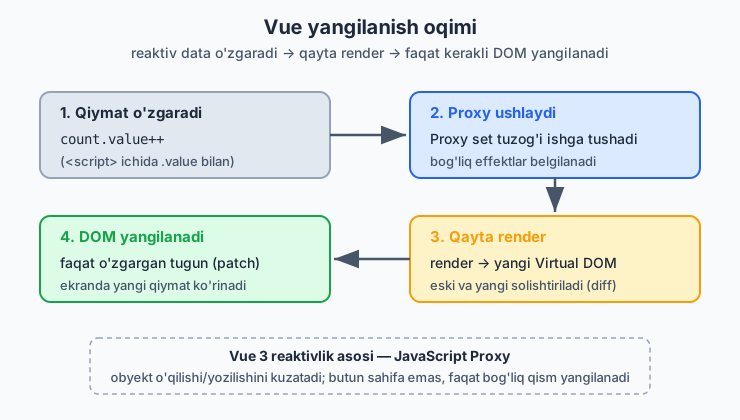
count.value o'zgargandan keyin nima sodir bo'lishini quyidagi oqim ko'rsatadi: Proxy o'zgarishni ushlaydi, komponent qayta render bo'ladi va faqat o'zgargan DOM qismi yangilanadi.
Xulosa (tez takrorlash)
{{ }}— interpolation (ifoda, statement emas)v-bind(:) — atribut bog'lashv-if/v-show— shartli ko'rinish (farqini bil)v-for— ro'yxat (:keydoim shart)v-on(@) — event + modifierlar:class/:style— dinamik stilref()— reaktiv qiymat,<script>'da.value
🎯 Masalalar (kamida 20 ta)
Har birini alohida komponent sifatida yoz. Yulduzcha (★) — qiyinroq.
Asosiy (1–10)
-
Salom dunyo:
nameref'i bo'lsin,<input>ga yozilgan ismni<h1>Salom, {{ name }}!</h1>da ko'rsat. (Maslahat: keyingi moduldav-model, hozir:value+@inputbilan qil.) -
Counter:
+,-,Resettugmalari. Son manfiy bo'lib ketmasin (min 0). -
Toggle: Bitta tugma matnni
Yoqilgan/O'chirilganga almashtirsin va:classbilan rangi o'zgarsin. -
Light/Dark: Tugma bosilganda
<div>foni qora/oq bo'lsin (:styleyoki:class). -
Ro'yxat render:
['Olma','Anor','Uzum']massivini<ul>da chiqar, har biriga tartib raqami qo'shib (1. Olma). -
Obyektlar ro'yxati:
[{id,name,price}]mahsulotlarni jadval (<table>) qilib chiqar. -
v-if mashqi:
ageref'i bo'lsin;<18→ "Voyaga yetmagan",18–60→ "Kattalar",>60→ "Keksa". -
v-show vs v-if: Bir xil kontentni ikkalasi bilan ko'rsat, DevTools Elements'da farqni kuzat va kodga izoh yoz: qaysi biri DOM'dan o'chadi.
-
Conditional class: Inputga matn yoz; uzunligi 8 dan kam bo'lsa border qizil, aks holda yashil.
-
Event modifier: Formada
@submit.preventishlat; submit'da inputdagi matnniconsole.logqil va sahifa qayta yuklanmasin.
O'rta (11–18)
-
Filtrlanadigan ro'yxat (★): Mahsulotlardan faqat
price > 100bo'lganini ko'rsat. (v-for+v-ifni bir elementda EMAS — vaqtincha massivni.filter()bilan template'da yoki alohida o'zgaruvchida.) -
Tab tizimi: 3 ta tab tugmasi. Tanlangan tabga
activeklass berilsin, pastida mos kontent (v-if/v-show) ko'rinsin. -
Accordion (★): Bir nechta savol-javob. Bosilganda javob ochilsin/yopilsin. Bir vaqtda faqat bittasi ochiq bo'lsin.
-
Rangli ro'yxat:
v-forda juft indeksli qatorlar kulrang, toq indekslilar oq bo'lsin (:class+index % 2). -
Keyboard: Inputda
@keyup.enterbo'lsa matnni ro'yxatga qo'shsin (to-do boshlanishi). -
Disabled tugma: Input bo'sh bo'lsa "Qo'shish" tugmasi
:disabledbo'lsin. -
Inline style slider: Input range (0–100) qiymatiga qarab
<div>kengligi%da o'zgarsin (progress bar). -
Dynamic attribute (★):
:[attrName]="value"(dynamic argument) ishlatib, tugma orqaliidyokititleatributini almashtir.
Loyiha darajasi (19–24)
-
To-Do v0 (★): Vazifa qo'shish, ro'yxatda ko'rsatish, har birini "bajarildi" (line-through klass) qilish, o'chirish. (
computed/v-modelsiz, faqat shu modul vositalari bilan — keyin yaxshilaysan.) -
Mahsulot kartochkalari (★): Mahsulotlar massivini grid kartochka qilib chiqar. Har kartochkada nom, narx, "Sotuvda yo'q" badge (agar
stock === 0). -
Soddagina kalkulyator (★★): Ikki input + amal tugmalari (+ − × ÷). Natijani ko'rsat. Nolga bo'lishni ushlab qol.
-
FAQ qidiruv (★★): FAQ ro'yxati + qidiruv input. Faqat matni qidiruvga mos keladiganlari ko'rinsin.
-
Yulduzli reyting (★★): 5 ta yulduz. Hover/click bilan reyting tanlash, tanlangani to'ldirilgan ko'rinsin.
-
Mini galereya (★★): Rasmlar massivi; biriga bossang katta ko'rinishda (preview) chiqsin,
activerasm chegarasi ajralib tursin.
✅ Ba'zi yechimlar (o'zing urinib ko'rgach qara!)
2-masala — Counter
<script setup>
import { ref } from 'vue'
const count = ref(0)
const inc = () => count.value++
const dec = () => { if (count.value > 0) count.value-- }
const reset = () => count.value = 0
</script>

<template>
  <p>Hisob: {{ count }}</p>
  <button @click="dec">-</button>
  <button @click="reset">Reset</button>
  <button @click="inc">+</button>
</template>
13-masala — Accordion (bir vaqtda bitta ochiq)
<script setup>
import { ref } from 'vue'
const faqs = ref([
  { id: 1, q: 'Vue nima?', a: 'Progressive JS framework.' },
  { id: 2, q: 'Nuxt nima?', a: 'Vue uchun meta-framework.' },
])
const openId = ref(null)
function toggle(id) {
  openId.value = openId.value === id ? null : id
}
</script>

<template>
  <div v-for="f in faqs" :key="f.id">
    <button @click="toggle(f.id)">{{ f.q }}</button>
    <p v-show="openId === f.id">{{ f.a }}</p>
  </div>
</template>
19-masala — To-Do v0
<script setup>
import { ref } from 'vue'
const text = ref('')
const todos = ref([])
let nextId = 1

function add() {
  const t = text.value.trim()
  if (!t) return
  todos.value.push({ id: nextId++, title: t, done: false })
  text.value = ''
}
function toggle(todo) { todo.done = !todo.done }
function remove(id) {
  todos.value = todos.value.filter(t => t.id !== id)
}
</script>

<template>
  <input :value="text" @input="text = $event.target.value" @keyup.enter="add" placeholder="Vazifa...">
  <button @click="add" :disabled="!text.trim()">Qo'shish</button>

  <ul>
    <li v-for="todo in todos" :key="todo.id">
      <span :class="{ done: todo.done }" @click="toggle(todo)">{{ todo.title }}</span>
      <button @click="remove(todo.id)">×</button>
    </li>
  </ul>
</template>

<style scoped>
.done { text-decoration: line-through; opacity: 0.5; cursor: pointer; }
</style>
➡️ Keyingi: 02 — Reactivity