03 — Komponentlar
⬅️ Oldingi: 02 — Reactivity · 🏠 README · Keyingi: 04 — Composition API ➡️
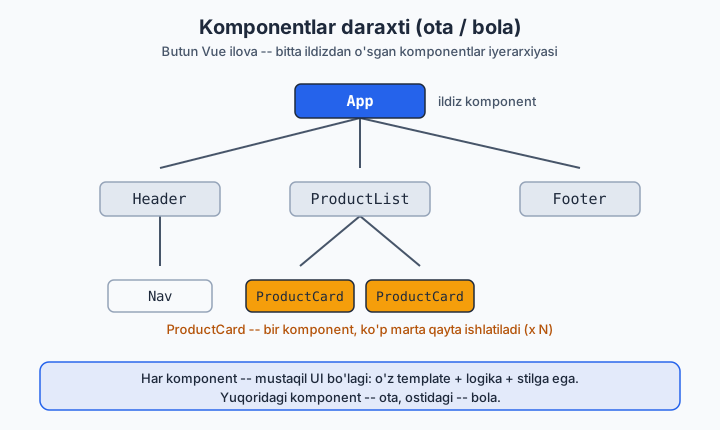
Komponent — qayta ishlatiladigan, mustaqil UI bo'lagi (o'z template + logika + stilga ega). Butun Vue ilova — komponentlar daraxti.
Laravel analogiyasi: Blade component (<x-card>) yoki Livewire component. Lekin Vue komponenti brauzerda interaktiv yashaydi va o'z holatini (state) saqlaydi.
Quyidagi diagramma shu daraxtni vizual ko'rsatadi (ota yuqorida, bola ostida):
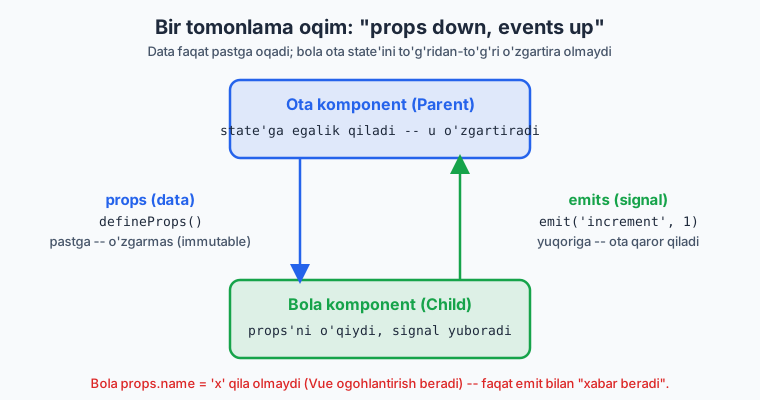
Ma'lumot oqimi (data flow): Vue'da bir tomonlama (one-way) — yuqoridan pastga: - Pastga: ota → bola, props orqali. - Tepaga: bola → ota, events (emit) orqali.
Bu "props down, events up" qoidasi. Bola props'ni o'zgartira olmaydi (faqat ota o'zgartiradi). Bu — taxmin qilinadigan (predictable) data flow uchun.
Quyidagi diagramma bu bir tomonlama oqimni ko'rsatadi: props pastga (data), emit yuqoriga (signal):
3.1 Komponentni ro'yxatdan o'tkazish va ishlatish
<!-- ChildCard.vue -->
<script setup>
</script>
<template>
  <div class="card">Men bolaman</div>
</template>
<!-- Parent.vue -->
<script setup>
import ChildCard from './ChildCard.vue'   // import — bas, registratsiya avtomatik
</script>

<template>
  <ChildCard />
  <ChildCard />   <!-- qayta ishlatish -->
</template>
<script setup>da import qilingan komponent darrov template'da ishlatishga tayyor. Alohidacomponents: {}e'lon qilish shart emas.
3.2 Props — ota'dan bola'ga data
<!-- UserCard.vue -->
<script setup>
// defineProps — kompilyator makrosi (import qilish shart emas)
const props = defineProps({
  name: { type: String, required: true },
  age: { type: Number, default: 0 },
  isActive: { type: Boolean, default: false },
  roles: { type: Array, default: () => [] },     // obyekt/massiv default — funksiya orqali!
  user: { type: Object, default: () => ({}) },
})

// props.name, props.age — script'da shunday ishlatasan
console.log(props.name)
</script>

<template>
  <div :class="{ active: isActive }">
    {{ name }}, {{ age }} yosh
  </div>
</template>
Diqqat:
- Statik string: name="Oqil" (tirnoqsiz v-bind).
- Son/bool/massiv/obyekt: : (v-bind) shart — :age="25", aks holda "25" string bo'lib ketadi.
- Template'da camelCase prop → HTML'da kebab-case: isActive → :is-active.
- Obyekt/massiv default qiymati funksiya orqali beriladi (default: () => []), aks holda barcha instansiyalar bitta obyektni baham ko'radi.
TypeScript bilan props (zamonaviy, tavsiya)
<script setup lang="ts">
interface Props {
  name: string
  age?: number
  roles?: string[]
}
const props = withDefaults(defineProps<Props>(), {
  age: 0,
  roles: () => [],
})
</script>
Props o'zgarmas (immutable)!
// ❌ props'ni mutatsiya qilish — Vue ogohlantirish beradi
props.name = 'Boshqa'

// ✅ Agar lokal o'zgartirish kerak bo'lsa — computed yoki lokal ref
const localName = ref(props.name)
const upper = computed(() => props.name.toUpperCase())
3.3 Emits — bola'dan ota'ga signal
<!-- Counter.vue -->
<script setup>
const props = defineProps({ modelValue: Number })
const emit = defineEmits(['increment', 'reset'])   // qaysi eventlarni chiqarishini e'lon qil

function add() {
  emit('increment', 1)        // event nomi + payload
}
</script>

<template>
  <button @click="add">+</button>
  <button @click="emit('reset')">Reset</button>
</template>
<!-- Parent -->
<script setup>
import { ref } from 'vue'
import Counter from './Counter.vue'
const total = ref(0)
</script>

<template>
  <Counter @increment="total += $event" @reset="total = 0" />
  <p>{{ total }}</p>
</template>
TS bilan emits (type-safe)
Nega emit? Bola ota'ning state'ini to'g'ridan-to'g'ri o'zgartira olmaydi. U faqat "menda biror narsa bo'ldi" deb xabar beradi, ota qaror qabul qiladi. Bu — DDD'dagi domain event'ga o'xshaydi: agregat o'zgarishni e'lon qiladi, listener reaksiya qiladi.
3.4 v-model komponentlarda (two-way binding)
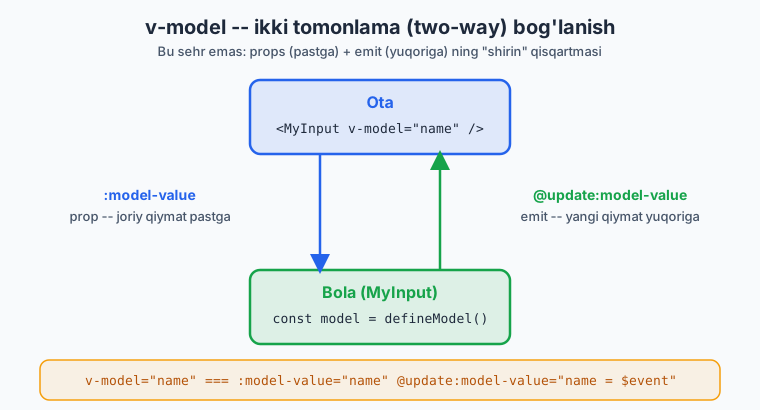
v-model — props + emit ning "shirin" qisqartmasi. Form komponentlari uchun ideal.
Vue 3.4+ (defineModel — zamonaviy, eng oson)
<!-- MyInput.vue -->
<script setup>
const model = defineModel()   // ref kabi ishlaydi, o'qish/yozish two-way
</script>

<template>
  <input :value="model" @input="model = $event.target.value">
</template>
<!-- Parent -->
<script setup>
import { ref } from 'vue'
import MyInput from './MyInput.vue'
const name = ref('')
</script>

<template>
  <MyInput v-model="name" />
  <p>{{ name }}</p>
</template>
v-model="name" ichki tomondan :model-value="name" @update:model-value="name = $event" ga teng. defineModel() shu mexanizmni avtomatik o'raydi.
Quyidagi diagramma v-model ning ikki tomonlama mexanizmini (prop pastga + emit yuqoriga) ochib beradi:
Bir nechta v-model (named)
<!-- UserForm.vue -->
<script setup>
const firstName = defineModel('firstName')
const lastName = defineModel('lastName')
</script>
Native input'da v-model (asoslar)
<input v-model="text">                  <!-- text input -->
<input type="checkbox" v-model="agree">  <!-- boolean -->
<input type="checkbox" v-model="picks" value="a">  <!-- massivga to'planadi -->
<select v-model="country">...</select>
<textarea v-model="bio"></textarea>

<!-- modifierlar -->
<input v-model.trim="name">       <!-- bo'shliqni kesadi -->
<input v-model.number="age">      <!-- songa aylantiradi -->
<input v-model.lazy="x">          <!-- change'da (input emas) yangilanadi -->
3.5 Slots — kontent uzatish
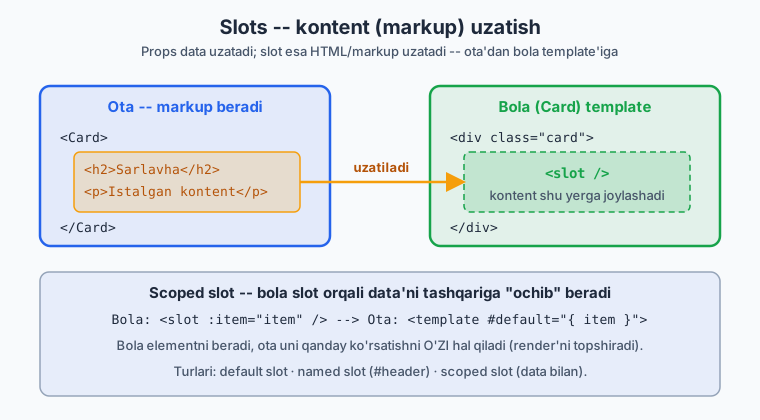
Props — data uzatadi. Slot — markup/HTML uzatadi. Komponentni "o'rovchi" (wrapper) qilib moslashuvchan qiladi.
Quyidagi diagramma ota bergan markup bola template'idagi <slot> teshigiga qanday joylashishini ko'rsatadi:
Default slot
<!-- Card.vue -->
<template>
  <div class="card">
    <slot>Default kontent (hech narsa berilmasa)</slot>
  </div>
</template>
Named slots (nomli)
<!-- Layout.vue -->
<template>
  <header><slot name="header" /></header>
  <main><slot /></main>            <!-- default -->
  <footer><slot name="footer" /></footer>
</template>
<!-- Parent -->
<Layout>
  <template #header><h1>Logo</h1></template>
  <p>Asosiy kontent (default slot)</p>
  <template #footer>© 2026</template>
</Layout>
#header — v-slot:header ning qisqartmasi.
Scoped slots (bola → ota slot'ga data uzatadi)
Eng kuchli pattern. Ro'yxat/jadval kabi qayta ishlatiladigan komponentlarda render'ni iste'molchiga topshirish uchun:
<!-- List.vue -->
<script setup>
defineProps({ items: Array })
</script>
<template>
  <ul>
    <li v-for="item in items" :key="item.id">
      <slot :item="item" :index="item.id">{{ item.name }}</slot>
    </li>
  </ul>
</template>
<!-- Parent — render qanday bo'lishini O'ZI hal qiladi -->
<List :items="users">
  <template #default="{ item }">
    <strong>{{ item.name }}</strong> — {{ item.email }}
  </template>
</List>
Laravel analogiyasi: Blade slot ({{ $slot }}, {{ $header }}) bilan deyarli bir xil g'oya. Scoped slot esa — bola ichki ma'lumotni tashqariga "ochib" beradi, bu Blade'da yo'q kuchli imkoniyat.
3.6 provide / inject — chuqur uzatish (prop drilling'siz)
Ota → uzoq nabira'gacha props'ni har bosqichda uzatish charchatadi (prop drilling). provide/inject — daraxtning istalgan chuqurligiga to'g'ridan-to'g'ri yetkazadi.
<!-- Ota (yuqorida) -->
<script setup>
import { provide, ref } from 'vue'
const theme = ref('dark')
provide('theme', theme)              // kalit + qiymat (reaktiv ham bo'ladi)
provide('toggleTheme', () => {
  theme.value = theme.value === 'dark' ? 'light' : 'dark'
})
</script>
<!-- Uzoq nabira -->
<script setup>
import { inject } from 'vue'
const theme = inject('theme')                  // reaktiv qoladi
const toggle = inject('toggleTheme')
const x = inject('maybe', 'default-qiymat')     // bo'lmasa default
</script>
provide/injectni lokal/feature-darajadagi umumiy holat uchun ishlat (masalan, theme, form konteksti). Global ilova holati uchun esa Pinia (06-modul) yaxshiroq — u DevTools, type-safety, struktura beradi.
Type-safe provide/inject (TS):
import { InjectionKey } from 'vue'
const ThemeKey: InjectionKey<Ref<string>> = Symbol('theme')
provide(ThemeKey, theme)
const t = inject(ThemeKey)   // tipi to'g'ri aniqlanadi
3.7 Boshqa muhim narsalar (qisqacha)
<!-- Dynamic component -->
<component :is="currentTab" />        <!-- currentTab — komponent yoki nomi -->

<!-- KeepAlive — komponent holatini eslab qoladi (qayta yaratmaydi) -->
<KeepAlive><component :is="currentTab" /></KeepAlive>

<!-- Async component (lazy loading) -->
<script setup>
import { defineAsyncComponent } from 'vue'
const Heavy = defineAsyncComponent(() => import('./Heavy.vue'))
</script>

<!-- Fallthrough attributes -->
<!-- Ota <MyBtn class="x" @click="..."> bersa, MyBtn ichidagi root elementga avtomatik o'tadi -->
Component naming: Fayl/komponent nomi — PascalCase (UserCard.vue). Template'da ham <UserCard>. Bu native HTML teglardan ajratib turadi.
Xulosa
- Props — ota→bola data (immutable, bola o'zgartirmaydi)
- Emits — bola→ota signal (
defineEmits, payload bilan) - v-model — props+emit qisqartmasi (
defineModel(), 3.4+) - Slots — markup uzatish (default / named / scoped)
- provide/inject — chuqur uzatish, prop drilling'siz (lokal scope uchun)
- Data flow: props down, events up
🎯 Masalalar (kamida 22 ta)
Props (1–6)
BaseButtonkomponenti:label(string),variant('primary'/'danger') props.variantga qarab:classbilan rang berilsin.Avatar:src,alt,size(number) props.sizega qarab inlinewidth/height.Badge:count(number) prop.count > 99bo'lsa99+ko'rsat.ProductCard(★):product(obyekt) props — nom, narx, rasm.definePropsda obyekt default'ini to'g'ri ber (() => ({})).- ❓ Bolada
props.title = 'x'qilsang nima bo'ladi? Sinab ko'r, console'dagi warning'ni o'qib, to'g'ri yondashuvni yoz. - TS bilan:
interface PropsorqaliUserCardprops'ini type qil,withDefaultsishlat.
Emits (7–11)
Counterkomponenti@changeevent chiqarsin (yangi qiymat bilan); ota qabul qilib ko'rsatsin.DeleteButton(★): bosilganda@confirm-deleteevent'iniidbilan chiqarsin; ota ro'yxatdan o'chirsin.SearchBox: input o'zgarganda@searchevent'ini matn bilan chiqarsin (debounce bo'lsa ★★).Rating(★): yulduz bosilsa@rateevent'ini1..5bilan chiqarsin.- TS bilan: yuqoridagi
Ratingemits'inidefineEmits<{...}>()orqali type-safe qil.
v-model (12–16)
TextField(★):defineModel()bilan reusable input yarat; otadav-modelbilan ulang.Toggle(★): switch ko'rinishidagi booleanv-modelkomponenti (defineModel()).QuantityInput(★):−/+tugmali son inputi;v-modelbilan, min/max props bilan chegaralangan.- Bir nechta v-model (★★):
NameFormkomponentiv-model:firstvav-model:lastqabul qilsin. StarRatingniv-modelga aylantir (12-emit o'rniga two-way).
Slots (17–21)
Card(★): default slot +#header/#footernamed slotlar bilan.Modal(★★):#title, default (body),#actionsslotlari;isOpenprop +@closeemit bilan.Alert:typeprop (success/error/warning) + default slot (xabar matni).- Scoped slot (★★):
DataListkomponentiitemsprops oladi, har element renderini scoped slot orqali otaga topshiradi. - Scoped slot jadval (★★):
DataTable—columnsvarowsprops; har katak renderini#cell="{ row, column }"scoped slot bilan moslashtir.
provide/inject va kompozitsiya (22–26)
provide/inject(★): Otatheme(ref) bersin, uzoqdagiThemedButtoninjectqilib rangini moslashtirsin; ota'dagi tugma theme'ni toggle qilsin.- Prop drilling vs inject (★★): Bir xil datani 3 qavat props bilan, keyin
provide/injectbilan uzat — kod farqini taqqosla, izoh yoz. - Dynamic component (★★): 3 ta tab komponenti;
<component :is>bilan almashtir;<KeepAlive>qo'shib, tab almashganda input qiymati saqlanishini ko'rsat. - Composable + komponent (★★★):
useToggle()composable yoz (04-modul oldindan),Modalda ishlatibisOpenni boshqar. - Mini dizayn tizimi (★★★):
BaseButton,BaseInput,BaseCard,BaseModal— barchasi props/emits/slots bilan izchil API'ga ega bo'lsin. Bittagina demo sahifada hammasidan foydalan (EduCore UI kit boshlanishi 😉).
✅ Tanlangan yechimlar
12 — TextField (defineModel)
20 — Scoped slot (DataList)
22 — provide/inject theme
<!-- App.vue (ota) -->
<script setup>
import { provide, ref } from 'vue'
import ThemedButton from './ThemedButton.vue'
const theme = ref('dark')
provide('theme', theme)
</script>
<template>
  <button @click="theme = theme === 'dark' ? 'light' : 'dark'">Theme: {{ theme }}</button>
  <ThemedButton />   <!-- istalgancha chuqur bo'lsa ham ishlaydi -->
</template>
<!-- ThemedButton.vue (nabira) -->
<script setup>
import { inject, computed } from 'vue'
const theme = inject('theme', ref('light'))
const cls = computed(() => theme.value === 'dark' ? 'bg-black text-white' : 'bg-white text-black')
</script>
<template>
  <button :class="cls">Men theme'ga moslashaman</button>
</template>
➡️ Keyingi: 04 — Composition API & Composables