07 — Shablon iyerarxiyasi amalda
⬅️ Oldingi: 06 — Template teglar va shartli teglar · 🏠 README · Keyingi: 08 — header, footer, sidebar va get_template_part ➡️
Bu bobda: 03-bobda ko'rgan template hierarchy nazariyasini AMALDA qo'llaymiz. Har bir asosiy shablon faylni (
index.php,single.php,page.php,archive.php,category.php,search.php,404.php) o'z qo'limiz bilan yozamiz. So'ng maxsus shablonlar (single-{type}.php,page-{slug}.php,category-{slug}.php) va foydalanuvchi qo'lda tanlaydigan custom page template (Template Name:) yaratamiz. Oxirida WordPress qaysi faylni qaysi tartibda tanlashini real misollarda kuzatamiz.
Nima qilamiz va nega
03-bobda WordPress so'rovni qabul qilib, qaysi shablon faylni tanlashini ko'rgan edik. Bu bob — o'sha bilimni HAYOTGA tatbiq etish. Tasavvur qiling: sizda kichik blog/portfolio temasi bor. Foydalanuvchi turli manzillarga kiradi:
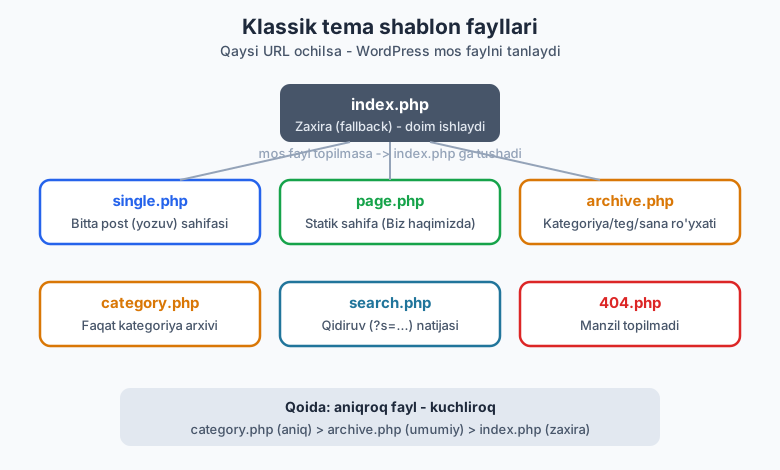
/salom-dunyo/— bitta post -> WordPresssingle.phpni qidiradi./biz-haqimizda/— statik sahifa ->page.php./category/dasturlash/— kategoriya arxivi ->category.php, topilmasaarchive.php./?s=wordpress— qidiruv ->search.php./bunaqa-sahifa-yoq/— manzil topilmadi ->404.php.
Sizning vazifangiz — shu fayllarni yozish. WordPress qolganini o'zi qiladi: URL ni tahlil qiladi, mos faylni topadi, ichidagi The Loop kodini ishga tushiradi.
Eng muhim qoida bitta: aniqroq fayl — kuchliroq. WordPress har doim eng aniq mos faylni qidiradi; topmasa, bir pog'ona umumiyroqqa tushadi; oxir-oqibat hamma yo'l index.php ga olib boradi. Shuning uchun index.php har temada MAJBURIY — u oxirgi zaxira (fallback).
Eslatma: bu bobdagi har bir kod jonli WordPress 7.0 (PHP 8.4) muhitida
php -lbilan sintaksis tekshirilgan vach07-testtest temasiga yozib sinab ko'rilgan. Foydalanilgan barcha funksiyalar (the_archive_title,get_search_query,the_posts_paginationva h.k.) jonli WP'dafunction_existsorqali tasdiqlangan.
index.php — zaxira shablon
index.php — temaning yuragi. Boshqa hech qaysi mos fayl topilmasa, WordPress shu faylga qaytadi. Texnik jihatdan minimal klassik tema faqat style.css + index.php dan iborat bo'lishi mumkin (buni 02-bobda ko'rgandik). Shuning uchun index.php ni shunday yozamizki, u har qanday vaziyatda (ro'yxat ham, alohida yozuv ham) ishlay olsin.
<?php
/**
 * Asosiy zaxira shablon (fallback).
 * Iyerarxiyada mos fayl topilmasa, WordPress doim shu faylga tushadi.
 */

get_header();
?>

<main id="primary" class="site-main">

    <?php if ( have_posts() ) : ?>

        <?php while ( have_posts() ) : the_post(); ?>

            <article id="post-<?php the_ID(); ?>" <?php post_class(); ?>>
                <header class="entry-header">
                    <h2 class="entry-title">
                        <a href="<?php the_permalink(); ?>"><?php the_title(); ?></a>
                    </h2>
                </header>
                <div class="entry-summary">
                    <?php the_excerpt(); ?>
                </div>
            </article>

        <?php endwhile; ?>

        <?php the_posts_pagination(); ?>

    <?php else : ?>

        <p><?php esc_html_e( 'Hech narsa topilmadi.', 'mytheme' ); ?></p>

    <?php endif; ?>

</main>

<?php
get_sidebar();
get_footer();
Bu yerda yangi narsa kam — The Loop (05-bob), get_header/get_sidebar/get_footer (08-bobda batafsil). Diqqat qiling: the_posts_pagination() — sahifalash havolalarini (1, 2, 3 ...) chiqaradigan zamonaviy funksiya. Eski next_posts_link()/previous_posts_link() ham ishlaydi, lekin the_posts_pagination() bitta chaqiruvda butun navigatsiyani beradi.
esc_html_e()— matnni tarjima qilib (i18n, 28-bob) va HTML'dan xavfsizlab (escaping, 27-bob) ekranga chiqaradi. Hozircha "xavfsiz_e()" deb qabul qiling.
single.php — bitta post
URL bitta yozuvga (post) ishora qilsa, WordPress single.php ni tanlaydi. Bu yerda Loop atigi bitta yozuvni aylanadi, shuning uchun the_content() (to'liq matn) ishlatamiz, the_excerpt() (qisqartma) emas.
<?php
/**
 * Bitta post (single) shabloni.
 */

get_header();
?>

<main id="primary" class="site-main">

    <?php while ( have_posts() ) : the_post(); ?>

        <article id="post-<?php the_ID(); ?>" <?php post_class(); ?>>
            <header class="entry-header">
                <h1 class="entry-title"><?php the_title(); ?></h1>
                <div class="entry-meta">
                    <span class="posted-on"><?php echo esc_html( get_the_date() ); ?></span>
                    <span class="byline"><?php the_author(); ?></span>
                </div>
            </header>

            <?php if ( has_post_thumbnail() ) : ?>
                <div class="post-thumbnail"><?php the_post_thumbnail( 'large' ); ?></div>
            <?php endif; ?>

            <div class="entry-content">
                <?php
                the_content();
                wp_link_pages(
                    array(
                        'before' => '<div class="page-links">' . esc_html__( 'Sahifalar:', 'mytheme' ),
                        'after'  => '</div>',
                    )
                );
                ?>
            </div>

            <footer class="entry-footer"><?php the_category( ', ' ); ?></footer>
        </article>

        <?php
        if ( comments_open() || get_comments_number() ) {
            comments_template();
        }
        ?>

    <?php endwhile; ?>

</main>

<?php
get_sidebar();
get_footer();
E'tibor bering:
- Sarlavha bu yerda
<h1>(sahifaning asosiy sarlavhasi), ro'yxatda esa<h2>edi. Bu SEO va accessibility uchun to'g'ri amaliyot. wp_link_pages()— agar muallif yozuvni<!--nextpage-->bilan bo'laklarga bo'lsa, sahifa havolalarini chiqaradi.comments_template()— sharhlar bo'limini (comments.phpmavjud bo'lsa) ulaydi. Shartni tekshiramiz: sharhlar yopiq va bittasi ham yo'q bo'lsa, ko'rsatmaymiz.
page.php — statik sahifa
"Sahifa" (page) — sanasiz, kategoriyasiz statik kontent: Biz haqimizda, Aloqa, Maxfiylik siyosati. page.php single.php ga o'xshaydi, lekin odatda meta ma'lumot (sana, muallif) ko'rsatmaydi va sidebar'siz, kengroq bo'lishi mumkin.
<?php
/**
 * Statik sahifa (page) shabloni.
 */

get_header();
?>

<main id="primary" class="site-main">

    <?php while ( have_posts() ) : the_post(); ?>

        <article id="post-<?php the_ID(); ?>" <?php post_class(); ?>>
            <header class="entry-header">
                <h1 class="entry-title"><?php the_title(); ?></h1>
            </header>
            <div class="entry-content">
                <?php
                the_content();
                wp_link_pages(
                    array(
                        'before' => '<div class="page-links">' . esc_html__( 'Sahifalar:', 'mytheme' ),
                        'after'  => '</div>',
                    )
                );
                ?>
            </div>
        </article>

    <?php endwhile; ?>

</main>

<?php
get_footer();
Bu yerda get_sidebar() ataylab yo'q — sahifalar ko'pincha to'liq enlikda chiqadi. Bu sizning dizayn qaroringiz: xohlasangiz qo'shasiz.
archive.php — umumiy arxiv
Arxiv — yozuvlar RO'YXATI: kategoriya, teg, muallif, sana bo'yicha. archive.php shu hammasi uchun universal zaxira. Bu yerda yangi va juda foydali ikki funksiya bor:
the_archive_title()— joriy arxiv sarlavhasini AVTOMATIK chiqaradi: "Kategoriya: Dasturlash", "Teg: php", "Muallif: Oqil", "2026 yil iyun" va h.k. Qaysi arxiv ekanini o'zi aniqlaydi.the_archive_description()— agar kategoriya/teg uchun tavsif kiritilgan bo'lsa, uni chiqaradi.
<?php
/**
 * Umumiy arxiv shabloni.
 */

get_header();
?>

<main id="primary" class="site-main">

    <?php if ( have_posts() ) : ?>

        <header class="page-header">
            <?php
            the_archive_title( '<h1 class="page-title">', '</h1>' );
            the_archive_description( '<div class="archive-description">', '</div>' );
            ?>
        </header>

        <?php while ( have_posts() ) : the_post(); ?>

            <article id="post-<?php the_ID(); ?>" <?php post_class(); ?>>
                <h2 class="entry-title">
                    <a href="<?php the_permalink(); ?>"><?php the_title(); ?></a>
                </h2>
                <div class="entry-summary"><?php the_excerpt(); ?></div>
            </article>

        <?php endwhile; ?>

        <?php the_posts_pagination(); ?>

    <?php else : ?>

        <p><?php esc_html_e( 'Bu arxivda yozuv yo\'q.', 'mytheme' ); ?></p>

    <?php endif; ?>

</main>

<?php
get_sidebar();
get_footer();
the_archive_title( '<h1>', '</h1>' ) — birinchi argument sarlavhadan oldin, ikkinchisi keyin qo'shiladigan HTML. Bu o'rab olishni qulaylashtiradi.
category.php — faqat kategoriya arxivi
category.php archive.php dan AVVAL keladi (faqat kategoriya sahifalari uchun). Agar siz kategoriya arxivini boshqa arxivlardan farqli ko'rsatmoqchi bo'lsangiz (masalan, kategoriya nomini boshqacha formatlash), shu faylni yarating. U bo'lmasa, kategoriya ham archive.php ga tushadi.
<?php
/**
 * Kategoriya arxivi shabloni.
 * Iyerarxiyada archive.php dan OLDIN keladi.
 */

get_header();
?>

<main id="primary" class="site-main">

    <header class="page-header">
        <h1 class="page-title">
            <?php
            /* translators: %s: kategoriya nomi. */
            printf(
                esc_html__( 'Kategoriya: %s', 'mytheme' ),
                '<span>' . esc_html( single_cat_title( '', false ) ) . '</span>'
            );
            ?>
        </h1>
        <?php
        $cat_desc = category_description();
        if ( ! empty( $cat_desc ) ) {
            echo '<div class="archive-description">' . wp_kses_post( $cat_desc ) . '</div>';
        }
        ?>
    </header>

    <?php if ( have_posts() ) : ?>
        <?php while ( have_posts() ) : the_post(); ?>
            <article id="post-<?php the_ID(); ?>" <?php post_class(); ?>>
                <h2 class="entry-title">
                    <a href="<?php the_permalink(); ?>"><?php the_title(); ?></a>
                </h2>
                <div class="entry-summary"><?php the_excerpt(); ?></div>
            </article>
        <?php endwhile; ?>
        <?php the_posts_pagination(); ?>
    <?php else : ?>
        <p><?php esc_html_e( 'Bu kategoriyada yozuv yo\'q.', 'mytheme' ); ?></p>
    <?php endif; ?>

</main>

<?php
get_sidebar();
get_footer();
single_cat_title( '', false )— joriy kategoriya nomini QAYTARADI (ikkinchi argumentfalse=> echo emas, return). Biz uniesc_html()bilan o'rab xavfsizlab chiqaramiz.category_description()— kategoriya tavsifi (HTML bo'lishi mumkin), shuning uchunwp_kses_post()bilan filtrlaymiz.
search.php — qidiruv natijalari
URL'da ?s=... bo'lsa, WordPress search.php ni tanlaydi. Bu yerda eng muhim funksiya — get_search_query(): u foydalanuvchi qidirgan so'zni QAYTARADI (xavfsiz, escape qilingan holatda emas, shuning uchun chiqarishda esc_html() shart).
<?php
/**
 * Qidiruv natijalari shabloni.
 * URL ?s=... bo'lganda tanlanadi.
 */

get_header();
?>

<main id="primary" class="site-main">

    <header class="page-header">
        <h1 class="page-title">
            <?php
            /* translators: %s: qidirilgan so'z. */
            printf(
                esc_html__( 'Qidiruv natijasi: %s', 'mytheme' ),
                '<span>' . esc_html( get_search_query() ) . '</span>'
            );
            ?>
        </h1>
    </header>

    <?php if ( have_posts() ) : ?>
        <?php while ( have_posts() ) : the_post(); ?>
            <article id="post-<?php the_ID(); ?>" <?php post_class(); ?>>
                <h2 class="entry-title">
                    <a href="<?php the_permalink(); ?>"><?php the_title(); ?></a>
                </h2>
                <div class="entry-summary"><?php the_excerpt(); ?></div>
            </article>
        <?php endwhile; ?>
        <?php the_posts_pagination(); ?>
    <?php else : ?>
        <p>
            <?php
            /* translators: %s: qidirilgan so'z. */
            printf(
                esc_html__( '"%s" bo\'yicha hech narsa topilmadi.', 'mytheme' ),
                esc_html( get_search_query() )
            );
            ?>
        </p>
        <?php get_search_form(); ?>
    <?php endif; ?>

</main>

<?php
get_sidebar();
get_footer();
Natija topilmasa, get_search_form() bilan qidiruv formasini qayta ko'rsatish — yaxshi UX. Diqqat: get_search_query() natijasini DOIM esc_html() bilan o'rang — bu XSS hujumdan himoya qiladi, chunki qidiruv so'zi foydalanuvchidan keladi (27-bobda batafsil).
404.php — manzil topilmadi
URL hech qaysi yozuvga mos kelmasa, WordPress 404.php ni tanlaydi va HTTP 404 statusini yuboradi. Bu yerda Loop yo'q (ko'rsatadigan yozuv yo'q) — buning o'rniga foydali narsalar beramiz: qidiruv formasi, oxirgi yozuvlar, bosh sahifaga havola.
<?php
/**
 * 404 (topilmadi) shabloni.
 */

get_header();
?>

<main id="primary" class="site-main">

    <section class="error-404 not-found">
        <header class="page-header">
            <h1 class="page-title"><?php esc_html_e( 'Sahifa topilmadi (404)', 'mytheme' ); ?></h1>
        </header>

        <div class="page-content">
            <p><?php esc_html_e( 'Kechirasiz, bunday manzilda sahifa yo\'q.', 'mytheme' ); ?></p>

            <?php get_search_form(); ?>

            <h2><?php esc_html_e( 'Eng so\'nggi yozuvlar', 'mytheme' ); ?></h2>
            <ul>
                <?php
                wp_get_archives(
                    array(
                        'type'  => 'postbypost',
                        'limit' => 5,
                    )
                );
                ?>
            </ul>
        </div>
    </section>

</main>

<?php
get_footer();
wp_get_archives() — turli arxiv ro'yxatlarini chiqaradi; 'type' => 'postbypost' so'nggi yozuvlar havolalarini beradi. 404 sahifasi foydalanuvchini "yo'qotmaslik" uchun muhim — uni mazmunli qiling.
Maxsus shablonlar: aniqroq fayl, kuchliroq
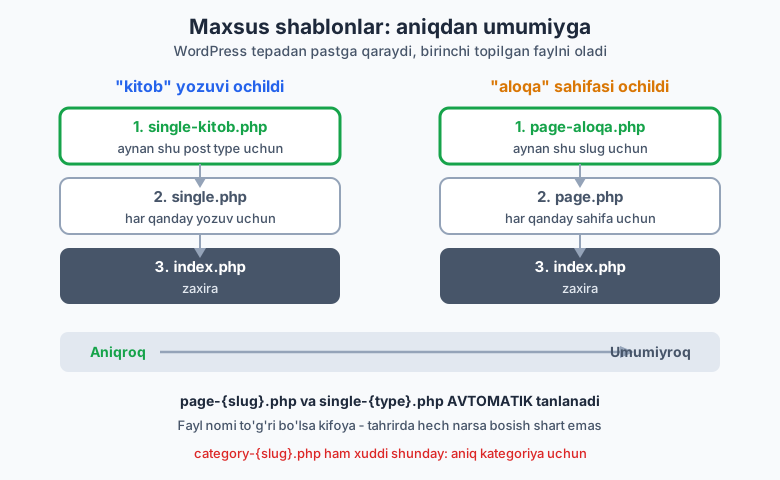
Endi qiziq joyga keldik. WordPress shunchaki single.php/page.php/category.php bilan cheklanmaydi — siz AYRIM yozuv/sahifa/kategoriya uchun ALOHIDA shablon yozishingiz mumkin. Fayl nomi sehrli: WordPress nomdan tushunadi.
single-{posttype}.php — post type uchun
Agar sizda kitob nomli custom post type bo'lsa (13-bobda yaratamiz), kitob yozuvi uchun single-kitob.php faylini yozsangiz, WordPress single.php o'rniga SHU faylni tanlaydi.
<?php
/**
 * "kitob" custom post type uchun maxsus single shablon.
 * Fayl nomi: single-{posttype}.php
 */

get_header();
?>

<main id="primary" class="site-main single-kitob">

    <?php while ( have_posts() ) : the_post(); ?>

        <article id="post-<?php the_ID(); ?>" <?php post_class(); ?>>
            <header class="entry-header">
                <h1 class="entry-title"><?php the_title(); ?></h1>
                <?php
                $muallif = get_post_meta( get_the_ID(), 'kitob_muallif', true );
                if ( $muallif ) {
                    echo '<p class="kitob-muallif">'
                        . esc_html__( 'Muallif:', 'mytheme' ) . ' '
                        . esc_html( $muallif ) . '</p>';
                }
                ?>
            </header>
            <div class="entry-content"><?php the_content(); ?></div>
        </article>

    <?php endwhile; ?>

</main>

<?php
get_sidebar();
get_footer();
Tanlash tartibi: single-kitob.php -> single.php -> singular.php -> index.php. Birinchi topilgan g'olib.
page-{slug}.php — sahifa slug'i uchun
/aloqa/ sahifasi uchun maxsus dizayn xohlaysizmi? page-aloqa.php yozing — WordPress uni page.php dan oldin tanlaydi. AVTOMATIK: tahrirda hech narsa bosish shart emas, faqat fayl nomi to'g'ri bo'lsa kifoya.
<?php
/**
 * "aloqa" slug'iga ega sahifa uchun maxsus shablon.
 * Fayl nomi: page-{slug}.php -> page-aloqa.php
 * AVTOMATIK tanlanadi (tahrirda tanlash shart emas).
 */

get_header();
?>

<main id="primary" class="site-main page-aloqa">

    <?php while ( have_posts() ) : the_post(); ?>

        <article id="post-<?php the_ID(); ?>" <?php post_class(); ?>>
            <header class="entry-header">
                <h1 class="entry-title"><?php the_title(); ?></h1>
            </header>
            <div class="entry-content"><?php the_content(); ?></div>

            <aside class="aloqa-info">
                <h2><?php esc_html_e( 'Bog\'lanish', 'mytheme' ); ?></h2>
                <p><?php esc_html_e( 'Telegram: @i_oqil', 'mytheme' ); ?></p>
            </aside>
        </article>

    <?php endwhile; ?>

</main>

<?php
get_footer();
Tanlash tartibi: page-{slug}.php -> page-{ID}.php -> page.php -> singular.php -> index.php. Slug bo'yicha (page-aloqa.php) yoki ID bo'yicha (page-42.php) ishlatish mumkin; slug afzal, chunki ID o'zgarib ketishi mumkin.
category-{slug}.php — bitta kategoriya uchun
Xuddi shu mantiq kategoriyaga ham tegishli. yangiliklar kategoriyasini boshqacha ko'rsatmoqchimisiz? category-yangiliklar.php yozing.
<?php
/**
 * "yangiliklar" kategoriyasi uchun maxsus shablon.
 * Fayl nomi: category-{slug}.php
 */

get_header();
?>

<main id="primary" class="site-main category-yangiliklar">

    <header class="page-header">
        <h1 class="page-title"><?php esc_html_e( 'Eng so\'nggi yangiliklar', 'mytheme' ); ?></h1>
    </header>

    <?php if ( have_posts() ) : ?>
        <?php while ( have_posts() ) : the_post(); ?>
            <article id="post-<?php the_ID(); ?>" <?php post_class(); ?>>
                <h2 class="entry-title">
                    <a href="<?php the_permalink(); ?>"><?php the_title(); ?></a>
                </h2>
                <time datetime="<?php echo esc_attr( get_the_date( 'c' ) ); ?>">
                    <?php echo esc_html( get_the_date() ); ?>
                </time>
            </article>
        <?php endwhile; ?>
    <?php endif; ?>

</main>

<?php
get_footer();
Tanlash tartibi: category-{slug}.php -> category-{ID}.php -> category.php -> archive.php -> index.php.
Custom page template (Template Name:)
Bu — bobning eng kuchli vositasi. page-{slug}.php bitta aniq sahifaga bog'langan. Lekin ba'zan siz BIR shablonni KO'P sahifaga qo'llamoqchi bo'lasiz — masalan, "To'liq enlik (full width)" yoki "Portfolio ko'rinishi". Buni custom page template hal qiladi.
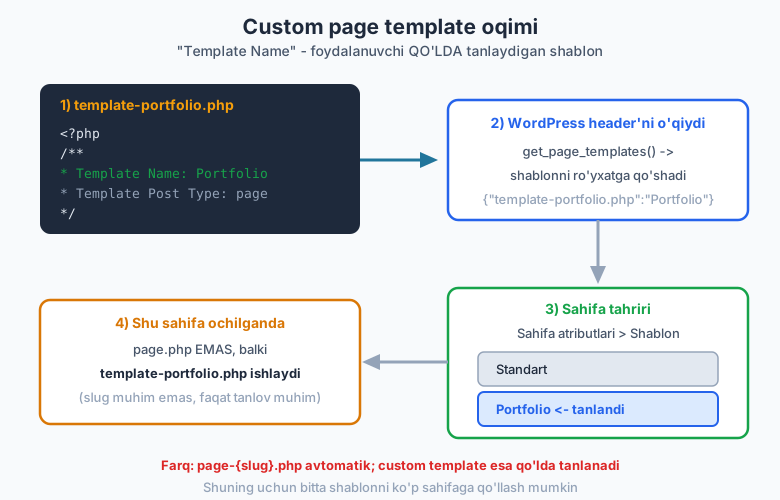
Sehr — fayl boshidagi maxsus PHP izoh blokida: Template Name:. Bu satr tufayli WordPress faylni sahifa tahriridagi "Sahifa atributlari > Shablon" ro'yxatiga qo'shadi. Foydalanuvchi uni QO'LDA tanlaydi.
<?php
/**
 * Template Name: Portfolio sahifasi
 * Template Post Type: page
 *
 * Bu CUSTOM PAGE TEMPLATE. Fayl nomi ahamiyatsiz (template- prefiks
 * shart emas, lekin tartibli). MUHIMI yuqoridagi "Template Name:" satri.
 */

get_header();
?>

<main id="primary" class="site-main page-template-portfolio">

    <?php while ( have_posts() ) : the_post(); ?>
        <header class="entry-header">
            <h1 class="entry-title"><?php the_title(); ?></h1>
        </header>
        <div class="entry-content"><?php the_content(); ?></div>
    <?php endwhile; ?>

    <section class="portfolio-grid">
        <?php
        $loyihalar = new WP_Query(
            array(
                'post_type'      => 'post',
                'posts_per_page' => 6,
                'category_name'  => 'portfolio',
            )
        );

        if ( $loyihalar->have_posts() ) :
            while ( $loyihalar->have_posts() ) :
                $loyihalar->the_post();
                ?>
                <article class="portfolio-item">
                    <a href="<?php the_permalink(); ?>">
                        <?php the_post_thumbnail( 'medium' ); ?>
                        <h3><?php the_title(); ?></h3>
                    </a>
                </article>
                <?php
            endwhile;
            wp_reset_postdata();
        else :
            echo '<p>' . esc_html__( 'Hozircha loyiha yo\'q.', 'mytheme' ) . '</p>';
        endif;
        ?>
    </section>

</main>

<?php
get_footer();
Header bloki sintaksisi — KRITIK:
Template Name: <nom>— MAJBURIY. Bu satr fayl boshidagi/** ... */izoh blokida bo'lishi shart. Nom ro'yxatda ko'rinadi (masalan "Portfolio sahifasi").Template Post Type: page— IXTIYORIY. Shablonni qaysi post tipiga ruxsat berishni cheklaydi. Bo'lmasa, faqat sahifalar (page) uchun ishlaydi.Template Post Type: page, postdeb ko'p tip ham berish mumkin.
Bu kod jonli WordPress 7.0'da tasdiqlangan: get_file_data() header'ni to'g'ri o'qidi va wp_get_theme()->get_page_templates() shablonni {"template-portfolio.php":"Portfolio sahifasi"} deb ro'yxatga qo'shdi.
Foydalanuvchi qanday tanlaydi: WordPress admin > Sahifalar > (sahifani tahrirlash) > o'ng paneldagi "Sahifa" yorlig'i > "Shablon" tanlovi > "Portfolio sahifasi". Tanlanganda, o'sha sahifa ochilganda page.php EMAS, template-portfolio.php ishlaydi.
Block tema eslatmasi: zamonaviy block (FSE) temalarda custom shablonlar PHP fayl emas,
templates/papkasidagi HTML fayllar bo'ladi vatheme.jsondacustomTemplatesorqali e'lon qilinadi (18-21-boblar). Bu yerda biz KLASSIK temani o'rganyapmiz;Template Name:usuli klassik temalarda bugun ham to'liq amal qiladi.
page-{slug}.php va custom template — farqi
Ko'pchilik bularni adashtiradi. Mana aniq farq:
| Xususiyat | page-aloqa.php |
Custom template (Template Name:) |
|---|---|---|
| Qachon ishlaydi | faqat aloqa slug'li sahifa |
tanlangan ISTALGAN sahifa |
| Tanlash | AVTOMATIK (fayl nomidan) | QO'LDA (tahrirda foydalanuvchi tanlaydi) |
| Qayta ishlatish | bitta sahifaga bog'liq | ko'p sahifaga qo'llanadi |
| Header sharti | yo'q | Template Name: MAJBURIY |
Qoidaga ko'ra: bitta aniq sahifaga (Aloqa) — page-{slug}.php; bir necha sahifaga umumiy ko'rinish (Portfolio, Full-width) — custom template.
Shablon tanlash mantig'i amalda
Endi hammasini birlashtiramiz. Faraz qilaylik, temangizda quyidagi fayllar bor: index.php, single.php, single-kitob.php, page.php, page-aloqa.php, archive.php, category.php, category-yangiliklar.php, search.php, 404.php, template-portfolio.php. WordPress turli URL'larda nimani tanlaydi?
| URL / vaziyat | Tanlanadigan fayl | Nega |
|---|---|---|
/salom-dunyo/ (oddiy post) |
single.php |
single-{type}.php yo'q (post type = post) |
/kitoblar/php-asoslari/ (kitob) |
single-kitob.php |
post type = kitob, aniq fayl bor |
/biz-haqimizda/ (sahifa) |
page.php |
maxsus slug/template tanlanmagan |
/aloqa/ (sahifa) |
page-aloqa.php |
slug = aloqa, aniq fayl bor |
/portfolio/ ("Portfolio" tanlangan) |
template-portfolio.php |
tahrirda custom template tanlangan |
/category/dasturlash/ |
category.php |
kategoriya, maxsus slug fayli yo'q |
/category/yangiliklar/ |
category-yangiliklar.php |
slug = yangiliklar, aniq fayl bor |
/tag/php/ |
archive.php |
tag.php yo'q -> umumiy arxivga |
/?s=wordpress |
search.php |
qidiruv so'rovi |
/yoq-sahifa/ |
404.php |
mos yozuv topilmadi |
Diqqat qiling: /tag/php/ archive.php ga tushdi, chunki tag.php yo'q edi. Agar tag.php ham, archive.php ham bo'lmasa — index.php ga tushardi. Hamma yo'l index.php ga olib boradi.
Tekshirish hiylasi: WordPress qaysi shablonni tanlaganini bilmoqchimisiz? Debug rejimida
functions.phpga shu kodni qo'shing:add_action( 'wp_footer', function() { global $template; echo "<!-- Shablon: " . esc_html( basename( $template ) ) . " -->"; } );— sahifa kodida (view source) qaysi fayl ishlaganini ko'rasiz. (Bu faqat tekshirish uchun; productionda olib tashlang.)
Verifikatsiya: bu bobdagi kod haqiqatan ishlaydimi?
Bu bobdagi 11 ta shablon fayli (index.php, single.php, page.php, archive.php, category.php, search.php, 404.php, single-kitob.php, page-aloqa.php, category-yangiliklar.php, template-portfolio.php) jonli WordPress 7.0 (PHP 8.4) muhitidagi ch07-test test temasiga yozildi va har biri php -l bilan tekshirildi — hammasida sintaksis xatosi yo'q.
Custom page template ayniqsa diqqat bilan tekshirildi. WordPress yadrosining o'zi (get_file_data() va wp_get_theme()->get_page_templates()) header'ni o'qib, shablonni quyidagicha ro'yxatga oldi:
Template Name: [Portfolio sahifasi]
Template Post Type: [page]
Topilgan page template'lar: {"template-portfolio.php":"Portfolio sahifasi"}
Ya'ni Template Name: sintaksisi to'g'ri va WordPress uni haqiqatan tanib oldi. Test temasi aktivlashtirilmadi (jonli sayt o'zgarmadi) — faqat read-only tarzda WP API orqali tekshirildi.
Mashqlar
Oson
-
index.phpzaxira shabloni. Bo'sh klassik temaga (style.cssmavjud)index.phpyozing: Loop bilan yozuvlar ro'yxatini chiqaradigan, har yozuvda<h2>sarlavha +the_excerpt()bo'lsin.get_header()/get_footer()chaqiring. -
single.phpyozing. Bitta postni to'liq ko'rsatadigan shablon:<h1>sarlavha,get_the_date()bilan sana,the_content()bilan to'liq matn. -
page.phpyozing. Statik sahifa shabloni: faqat<h1>sarlavha vathe_content(). Sana/muallif KO'RSATMANG. Sidebar'siz qiling. -
404.phpyozing. "Sahifa topilmadi" matni,get_search_form()bilan qidiruv formasi va bosh sahifaga (home_url()) qaytish havolasi bo'lsin.
O'rta
-
archive.phpdathe_archive_title(). Umumiy arxiv shabloni yozing. Sarlavhanithe_archive_title( '<h1 class="page-title">', '</h1>' )bilan, tavsifnithe_archive_description()bilan chiqaring. -
search.phpdaget_search_query(). Qidiruv shabloni yozing: sarlavhada "Qidiruv:get_search_query()+esc_html()). Natija topilmasa, "Topilmadi" + qidiruv formasi chiqsin. -
category.phpmaxsus arxiv.single_cat_title()bilan kategoriya nomini sarlavhada "Kategoriya: X" deb chiqaring;category_description()bo'lsa uniwp_kses_post()bilan ko'rsating. -
page-aloqa.phpmaxsus sahifa.aloqaslug'li sahifa uchun maxsus shablon yozing: oddiy sahifa kontentidan tashqari, aloqa ma'lumotlari (Telegram, email) bo'lgan<aside>qo'shing. Tushuntiring: nega bu fayl AVTOMATIK tanlanadi?
Qiyin
-
Custom page template yarating.
Template Name: To'liq enlikheader'li shablon yozing. U sidebar'siz, kontent kengroq chiqsin.Template Post Type: pageqo'shing. Header sintaksisini to'g'ri yozing. -
single-kitob.phppost type shabloni.kitobcustom post type uchun single shablon yozing. Sarlavha ostidaget_post_meta()bilankitob_muallifmeta maydonini (mavjud bo'lsa) ko'rsating. -
category-yangiliklar.phpmaxsus kategoriya.yangiliklarslug'li kategoriya uchun maxsus shablon: har yozuvda sarlavha +<time>teg ichidaget_the_date('c')(mashina o'qiydigan format). Tanlash tartibini izohda yozing. -
Shablon tanlash mantig'ini tahlil qiling. Quyidagi fayllar bor:
index.php,single.php,single-kitob.php,page.php,archive.php,category-yangiliklar.php,search.php. Quyidagi URL'lar uchun QAYSI fayl tanlanishini ayting va nega: (a) oddiy post; (b)kitobyozuvi; (c)/biz-haqimizda/sahifasi; (d)/category/yangiliklar/; (e)/category/dasturlash/; (f)/tag/php/. -
Universal yagona zaxira.
index.phpni shunday yozingki, u HAM yozuvlar ro'yxatini (arxiv/bosh sahifa), HAM bitta yozuvni (single/page) to'g'ri ko'rsata olsin. Maslahat:is_singular()shartidan foydalaning — single bo'lsathe_content(), ro'yxat bo'lsathe_excerpt(). -
Custom template'ni
page-{slug}.phpdan farqlang. Bir abzas yozing: qaysi holatdapage-{slug}.php, qaysi holatda custom template (Template Name:) ishlatasiz? Har biriga bittadan amaliy misol keltiring.
Yechimlar
Yechim — 1
<?php
/**
 * index.php - zaxira shablon, yozuvlar ro'yxati.
 */
get_header();
?>
<main id="primary" class="site-main">
    <?php if ( have_posts() ) : ?>
        <?php while ( have_posts() ) : the_post(); ?>
            <article <?php post_class(); ?>>
                <h2><a href="<?php the_permalink(); ?>"><?php the_title(); ?></a></h2>
                <div class="entry-summary"><?php the_excerpt(); ?></div>
            </article>
        <?php endwhile; ?>
    <?php else : ?>
        <p><?php esc_html_e( 'Hech narsa topilmadi.', 'mytheme' ); ?></p>
    <?php endif; ?>
</main>
<?php
get_footer();
php -l bilan tekshirilgan. Loop tashqarisida else shoxi yozuv yo'q holatini qoplaydi.
Yechim — 2
<?php
/**
* single.php - bitta post.
*/
get_header();
?>
<main id="primary" class="site-main">
<?php while ( have_posts() ) : the_post(); ?>
<article <?php post_class(); ?>>
<h1><?php the_title(); ?></h1>
<p class="entry-meta"><?php echo esc_html( get_the_date() ); ?> · <?php the_author(); ?></p>
<div class="entry-content"><?php the_content(); ?></div>
</article>
<?php endwhile; ?>
</main>
<?php
get_sidebar();
get_footer();
Single'da if ( have_posts() ) shart emas — bitta yozuv kafolatlangan, to'g'ridan-to'g'ri while ishlatiladi. the_content() (to'liq matn) ishlatamiz.
Yechim — 3
<?php
/**
 * page.php - statik sahifa, meta'siz, sidebar'siz.
 */
get_header();
?>
<main id="primary" class="site-main">
    <?php while ( have_posts() ) : the_post(); ?>
        <article <?php post_class(); ?>>
            <h1><?php the_title(); ?></h1>
            <div class="entry-content"><?php the_content(); ?></div>
        </article>
    <?php endwhile; ?>
</main>
<?php
get_footer();
Sahifalarda sana/muallif odatda keraksiz. get_sidebar() ataylab yo'q — sahifa to'liq enlikda chiqadi.
Yechim — 4
<?php
/**
 * 404.php - topilmadi.
 */
get_header();
?>
<main id="primary" class="site-main">
    <section class="error-404">
        <h1><?php esc_html_e( 'Sahifa topilmadi (404)', 'mytheme' ); ?></h1>
        <p><?php esc_html_e( 'Kechirasiz, bunday manzil yo\'q.', 'mytheme' ); ?></p>
        <?php get_search_form(); ?>
        <p>
            <a href="<?php echo esc_url( home_url( '/' ) ); ?>">
                <?php esc_html_e( 'Bosh sahifaga qaytish', 'mytheme' ); ?>
            </a>
        </p>
    </section>
</main>
<?php
get_footer();
home_url( '/' ) natijasini DOIM esc_url() bilan o'rang. 404 sahifasi Loop'siz — ko'rsatadigan yozuv yo'q.
Yechim — 5
<?php
/**
 * archive.php - umumiy arxiv.
 */
get_header();
?>
<main id="primary" class="site-main">
    <header class="page-header">
        <?php
        the_archive_title( '<h1 class="page-title">', '</h1>' );
        the_archive_description( '<div class="archive-description">', '</div>' );
        ?>
    </header>
    <?php if ( have_posts() ) : ?>
        <?php while ( have_posts() ) : the_post(); ?>
            <article <?php post_class(); ?>>
                <h2><a href="<?php the_permalink(); ?>"><?php the_title(); ?></a></h2>
                <div class="entry-summary"><?php the_excerpt(); ?></div>
            </article>
        <?php endwhile; ?>
        <?php the_posts_pagination(); ?>
    <?php else : ?>
        <p><?php esc_html_e( 'Yozuv yo\'q.', 'mytheme' ); ?></p>
    <?php endif; ?>
</main>
<?php
get_sidebar();
get_footer();
the_archive_title() qaysi arxiv (kategoriya/teg/sana/muallif) ekanini avtomatik aniqlaydi va mos sarlavha beradi. Argumentlar — sarlavhadan oldin/keyin qo'shiladigan HTML.
Yechim — 6
<?php
/**
 * search.php - qidiruv natijalari.
 */
get_header();
?>
<main id="primary" class="site-main">
    <header class="page-header">
        <h1 class="page-title">
            <?php
            /* translators: %s: qidirilgan so'z. */
            printf(
                esc_html__( 'Qidiruv: %s', 'mytheme' ),
                '<span>' . esc_html( get_search_query() ) . '</span>'
            );
            ?>
        </h1>
    </header>
    <?php if ( have_posts() ) : ?>
        <?php while ( have_posts() ) : the_post(); ?>
            <article <?php post_class(); ?>>
                <h2><a href="<?php the_permalink(); ?>"><?php the_title(); ?></a></h2>
                <div class="entry-summary"><?php the_excerpt(); ?></div>
            </article>
        <?php endwhile; ?>
    <?php else : ?>
        <p><?php esc_html_e( 'Hech narsa topilmadi.', 'mytheme' ); ?></p>
        <?php get_search_form(); ?>
    <?php endif; ?>
</main>
<?php
get_footer();
get_search_query() qidirilgan so'zni qaytaradi; u foydalanuvchidan kelgani uchun XSS'dan himoya sifatida DOIM esc_html() bilan o'raladi.
Yechim — 7
<?php
/**
 * category.php - kategoriya arxivi.
 */
get_header();
?>
<main id="primary" class="site-main">
    <header class="page-header">
        <h1 class="page-title">
            <?php
            /* translators: %s: kategoriya nomi. */
            printf(
                esc_html__( 'Kategoriya: %s', 'mytheme' ),
                '<span>' . esc_html( single_cat_title( '', false ) ) . '</span>'
            );
            ?>
        </h1>
        <?php
        $desc = category_description();
        if ( ! empty( $desc ) ) {
            echo '<div class="archive-description">' . wp_kses_post( $desc ) . '</div>';
        }
        ?>
    </header>
    <?php while ( have_posts() ) : the_post(); ?>
        <article <?php post_class(); ?>>
            <h2><a href="<?php the_permalink(); ?>"><?php the_title(); ?></a></h2>
        </article>
    <?php endwhile; ?>
</main>
<?php
get_sidebar();
get_footer();
single_cat_title( '', false ) — false => qaytaradi (echo qilmaydi), shuning uchun esc_html() bilan o'rab chiqaramiz. Tavsif HTML bo'lishi mumkin -> wp_kses_post().
Yechim — 8
<?php
/**
 * page-aloqa.php - "aloqa" slug'li sahifa uchun.
 */
get_header();
?>
<main id="primary" class="site-main">
    <?php while ( have_posts() ) : the_post(); ?>
        <article <?php post_class(); ?>>
            <h1><?php the_title(); ?></h1>
            <div class="entry-content"><?php the_content(); ?></div>
            <aside class="aloqa-info">
                <h2><?php esc_html_e( 'Bog\'lanish', 'mytheme' ); ?></h2>
                <p><?php esc_html_e( 'Telegram: @i_oqil', 'mytheme' ); ?></p>
                <p><?php esc_html_e( 'Email: salom@example.uz', 'mytheme' ); ?></p>
            </aside>
        </article>
    <?php endwhile; ?>
</main>
<?php
get_footer();
Nega avtomatik? WordPress iyerarxiyasida sahifa uchun avval page-{slug}.php (page-aloqa.php) qidiriladi, keyin page-{ID}.php, keyin page.php. Fayl nomi sahifa slug'iga mos kelsa, WP uni QO'LDA tanlashsiz oladi — bu iyerarxiyaning o'zida bor qoida.
Yechim — 9
<?php
/**
 * Template Name: To'liq enlik
 * Template Post Type: page
 */
get_header();
?>
<main id="primary" class="site-main full-width">
    <?php while ( have_posts() ) : the_post(); ?>
        <article <?php post_class(); ?>>
            <h1><?php the_title(); ?></h1>
            <div class="entry-content"><?php the_content(); ?></div>
        </article>
    <?php endwhile; ?>
</main>
<?php
// get_sidebar() ATAYLAB yo'q - to'liq enlik.
get_footer();
Eng muhimi — fayl boshidagi /** ... */ blokida Template Name: satri. Bu satr tufayli shablon admin'dagi "Sahifa atributlari > Shablon" ro'yxatiga chiqadi. Template Post Type: page uni faqat sahifalar uchun cheklaydi. Sidebar yo'qligi "to'liq enlik" ko'rinishini beradi.
Yechim — 10
<?php
/**
 * single-kitob.php - "kitob" post type uchun single.
 */
get_header();
?>
<main id="primary" class="site-main single-kitob">
    <?php while ( have_posts() ) : the_post(); ?>
        <article <?php post_class(); ?>>
            <h1><?php the_title(); ?></h1>
            <?php
            $muallif = get_post_meta( get_the_ID(), 'kitob_muallif', true );
            if ( $muallif ) {
                echo '<p class="kitob-muallif">'
                    . esc_html__( 'Muallif:', 'mytheme' ) . ' '
                    . esc_html( $muallif ) . '</p>';
            }
            ?>
            <div class="entry-content"><?php the_content(); ?></div>
        </article>
    <?php endwhile; ?>
</main>
<?php
get_footer();
get_post_meta( get_the_ID(), 'kitob_muallif', true ) — uchinchi argument true bitta qiymat qaytaradi. Bo'sh bo'lsa (if ( $muallif )) ko'rsatmaymiz. Tanlash tartibi: single-kitob.php -> single.php -> singular.php -> index.php.
Yechim — 11
<?php
/**
 * category-yangiliklar.php - "yangiliklar" kategoriyasi uchun.
 * Tartib: category-{slug}.php -> category-{ID}.php -> category.php
 *         -> archive.php -> index.php
 */
get_header();
?>
<main id="primary" class="site-main category-yangiliklar">
    <header class="page-header">
        <h1><?php esc_html_e( 'Eng so\'nggi yangiliklar', 'mytheme' ); ?></h1>
    </header>
    <?php while ( have_posts() ) : the_post(); ?>
        <article <?php post_class(); ?>>
            <h2><a href="<?php the_permalink(); ?>"><?php the_title(); ?></a></h2>
            <time datetime="<?php echo esc_attr( get_the_date( 'c' ) ); ?>">
                <?php echo esc_html( get_the_date() ); ?>
            </time>
        </article>
    <?php endwhile; ?>
</main>
<?php
get_footer();
get_the_date( 'c' ) — ISO 8601 (mashina o'qiydigan) format, datetime atributi uchun (esc_attr() bilan). Ko'rinadigan sana esa odam o'qiydigan format (get_the_date() argumentsiz).
Yechim — 12
Mavjud fayllar: index.php, single.php, single-kitob.php, page.php, archive.php, category-yangiliklar.php, search.php.
| URL | Tanlanadi | Nega |
|---|---|---|
| (a) oddiy post | single.php |
post type = post; single-post.php yo'q, single.php bor |
(b) kitob yozuvi |
single-kitob.php |
aniq post type fayli mavjud |
(c) /biz-haqimizda/ |
page.php |
maxsus slug/template yo'q -> umumiy page.php |
(d) /category/yangiliklar/ |
category-yangiliklar.php |
slug = yangiliklar, aniq fayl bor |
(e) /category/dasturlash/ |
archive.php |
category-dasturlash.php ham, category.php ham yo'q -> archive.php |
(f) /tag/php/ |
archive.php |
tag.php, tag-php.php yo'q -> archive.php |
Asosiy saboq: aniqroq fayl yo'q bo'lsa, WordPress bir pog'ona umumiyroqqa tushadi va oxir-oqibat index.php ga keladi.
Yechim — 13
<?php
/**
 * index.php - universal zaxira (ham ro'yxat, ham single).
 */
get_header();
?>
<main id="primary" class="site-main">
    <?php if ( have_posts() ) : ?>
        <?php while ( have_posts() ) : the_post(); ?>
            <article <?php post_class(); ?>>
                <?php if ( is_singular() ) : ?>
                    <h1><?php the_title(); ?></h1>
                    <div class="entry-content"><?php the_content(); ?></div>
                <?php else : ?>
                    <h2><a href="<?php the_permalink(); ?>"><?php the_title(); ?></a></h2>
                    <div class="entry-summary"><?php the_excerpt(); ?></div>
                <?php endif; ?>
            </article>
        <?php endwhile; ?>
        <?php if ( ! is_singular() ) { the_posts_pagination(); } ?>
    <?php else : ?>
        <p><?php esc_html_e( 'Hech narsa topilmadi.', 'mytheme' ); ?></p>
    <?php endif; ?>
</main>
<?php
get_footer();
is_singular() — bitta yozuv (post/page/CPT) ko'rsatilayotganini bildiradi. Shunda <h1> + to'liq matn; aks holda (ro'yxat) <h2> havola + qisqartma + sahifalash. Shu bitta fayl butun saytni qoplaydigan minimal tema asosini beradi.
Yechim — 14
page-{slug}.php — bitta MA'LUM sahifaga doimiy bog'langan dizayn kerak bo'lganda. Fayl nomi slug'ga bog'liq, avtomatik ishlaydi, foydalanuvchi hech narsa tanlamaydi. Misol: /aloqa/ sahifasiga doimo xarita + aloqa formasi kerak -> page-aloqa.php. Boshqa sahifa bu dizaynni hech qachon olmaydi.
Custom template (Template Name:) — BIR ko'rinishni KO'P sahifaga qo'llash kerak bo'lganda. Foydalanuvchi tahrirda qo'lda tanlaydi, bitta shablon cheksiz sahifaga ishlaydi. Misol: "To'liq enlik" yoki "Portfolio ko'rinishi" shabloni -> bugun "Xizmatlar" sahifasiga, ertaga "Loyihalar" sahifasiga tanlanadi.
Qisqa qoida: bitta aniq sahifa = page-{slug}.php; qayta ishlatiladigan ko'rinish = custom template.
⬅️ Oldingi: 06 — Template teglar va shartli teglar · 🏠 README · Keyingi: 08 — header, footer, sidebar va get_template_part ➡️